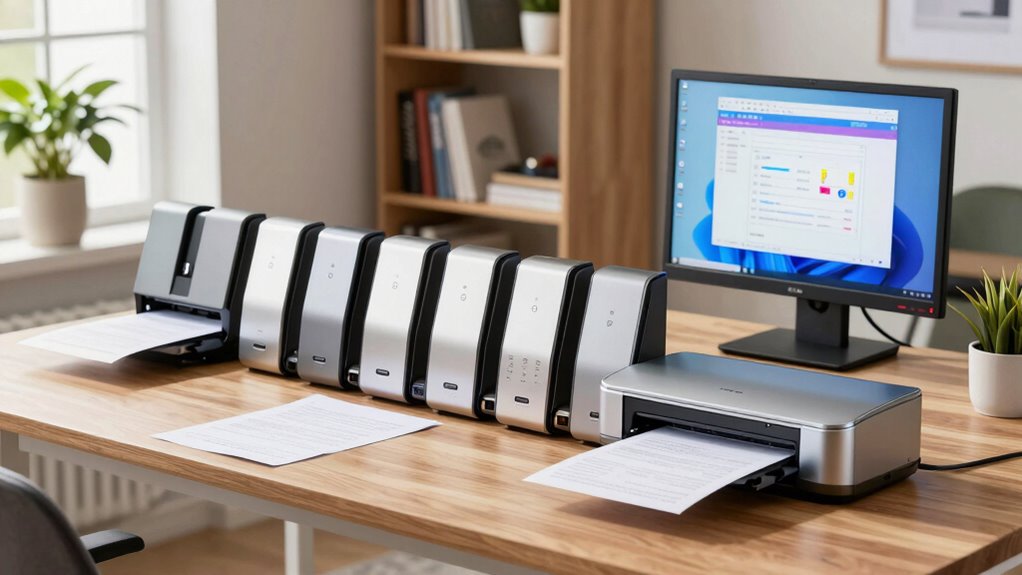

When it comes to managing large volumes of documents at home, a high speed scanner can transform your workflow. The best models combine fast scanning speeds, reliable duplexing, and user-friendly features that suit a home office environment. The Fujitsu ScanSnap iX1500 stands out as the overall top pick for its balance of speed, ease of use, and robust software. Brother ADS-2700W offers excellent wireless connectivity, making it ideal for multi-device setups, while the Epson Workforce ES-580W provides seamless wireless duplexing for busy households. Keep reading for a detailed breakdown to help you choose the right scanner for your needs.

Get beauty and skincare favorites delivered free — and shop member deals
- Fast, free delivery on millions of items
- Access to Prime Big Deal Days deals on October 6–7
- Prime Video, Amazon Music and more included
Complete the kit


Key Takeaways
- Fast scanning speeds are essential for efficiently handling large document batches, with most top models exceeding 30 pages per minute.
- Wireless connectivity options, such as Wi-Fi and mobile app support, are increasingly common and valuable for home setups.
- Duplex scanning significantly boosts productivity by allowing double-sided document capture without manual intervention.
- Build quality and reliability vary, with premium models offering more durable components and better long-term performance.
- Feature sets like touchscreen controls and portable designs are tailored to different user preferences, from professional use to casual home scanning.
| Fujitsu ScanSnap iX1500 Color Duplex Document Scanner with Touch Screen for Mac or PC, White (2018 Release) |  | Best Overall for User-Friendly High-Speed Scanning | Scanner Type: Document | Connection Type: USB, Wi-Fi | Resolution: 600 dpi | VIEW ON AMAZON | See Our Full Breakdown |
| Brother ADS-2700W Wireless High-Speed Desktop Document Scanner with Touchscreen LCD |  | Best for Versatile Connectivity and Media Handling | Connectivity: Wireless, Ethernet, USB 2.0 | Touchscreen: 2.8-inch color LCD | Scan Speed: Up to 35 pages per minute | VIEW ON AMAZON | See Our Full Breakdown |
| Brother ImageCenter ADS-2800W Wireless Document Scanner |  | Best for High-Speed Wireless Multi-Page Scanning | Scanning Speed: 40 pages per minute | Scan Modes: Single and double-sided, multi-page, continuous scan | Media Handling: Photos, documents, receipts, plastic cards | VIEW ON AMAZON | See Our Full Breakdown |
| Canon imageFORMULA R10 Portable Document Scanner |  | Best for Portability and Mobile Scanning | Power Consumption: 2.5W or less | Suggested Daily Volume: 500 scans | Scan Speed: 12 pages per minute | VIEW ON AMAZON | See Our Full Breakdown |
| Brother ADS-2200 High-Speed Desktop Document Scanner |  | Best for Small Spaces and Moderate Workloads | Scan Speed: Up to 35 ppm | Auto Document Filler Capacity: 50 sheets | Duplex Scanning: Yes | VIEW ON AMAZON | See Our Full Breakdown |
| Brother DS-640 Compact Mobile Document Scanner |  | Best Portable Scanner for On-the-Go Professionals | Scan Speed: 16 pages per minute | Weight: 1.5 lbs | Dimensions: Less than 1 foot in length | VIEW ON AMAZON | See Our Full Breakdown |
| Canon imageFORMULA R40II Office Document Scanner |  | Best Compact Duplex Scanner for Small Office Spaces | Scanner Type: Document | Connection Type: USB | Resolution: 600 dpi | VIEW ON AMAZON | See Our Full Breakdown |
| Epson Workforce ES-580W Wireless Color Duplex Desktop Document Scanner |  | Best Wireless High-Speed Scanner with Advanced Features | Touchscreen: 4.3 inches | Auto Document Feeder: 100 sheets | Speed: Up to 35 pages per minute | VIEW ON AMAZON | See Our Full Breakdown |
| Epson WorkForce ES-50 Compact & Lightweight Mobile Document Scanner |  | Best Mobile Scanner for Quick Single-Page Scans | Maximum Document Size: 8.5 x 72 inches | Scanning Speed: 5.5 seconds per page | Connectivity: USB 2.0 | VIEW ON AMAZON | See Our Full Breakdown |
| Epson Workforce ES-400 II High-Speed Color Duplex Desktop Document Scanner |  | Best High-Speed Duplex Desktop Scanner for Heavy Use | Auto Document Fewer: 50 sheets | Connectivity: TWAIN driver, cloud services | Features: duplex scanning, OCR, auto crop, background removal, double feed detection | VIEW ON AMAZON | See Our Full Breakdown |
| ScanSnap iX1300 Wireless or USB Double-Sided Color Document Scanner, White |  | Best Compact Scanner for Small Spaces | Scanner Type: Document, Receipt | Connection Type: USB, Wi-Fi | Resolution: 600 dpi | VIEW ON AMAZON | See Our Full Breakdown |
| ScanSnap iX2500 Wireless and USB High-Speed Document Scanner |  | Best for Fast, Reliable Large-Volume Scanning | Connectivity: Wi-Fi 6, USB-C | Scanning Speed: 45 pages per minute | Document Feeder Capacity: 100 sheets | VIEW ON AMAZON | See Our Full Breakdown |
| Brother ADS-4300N Professional Desktop Scanner with Fast Scan Speeds, Duplex, and Networking |  | Best for Secure, Network-Integrated Office Use | Scan Speed: 40 pages per minute | Auto Document Feeder Capacity: 80 pages | Connectivity: Ethernet, Wi-Fi, USB | VIEW ON AMAZON | See Our Full Breakdown |
| Brother ADS-4900W Professional Desktop Scanner with Fast Scan Speeds, Duplex, Wireless, and Large Touchscreen |  | Best for High-Speed, Multi-Page Scanning with User-Friendly Interface | Scan Speed: 60 pages per minute | Auto Document Feeder Capacity: 100 pages | Connectivity: Wireless, Ethernet, USB 3.0 | VIEW ON AMAZON | See Our Full Breakdown |
| high speed document scanners for home office | Connectivity |
|---|---|
| Fujitsu ScanSnap iX1500 Color | — |
| Brother ADS-2700W Wireless Hig | Wireless, Ethernet, USB 2.0 |
| Brother ImageCenter ADS-2800W | Wireless, Web Connect |
| Canon imageFORMULA R10 Portabl | — |
| Brother ADS-2200 High-Speed De | USB, wireless (requires setup) |
| Brother DS-640 Compact Mobile | Micro USB 3.0 |
| Canon imageFORMULA R40II Offic | — |
| Epson Workforce ES-580W Wirele | Wireless, USB, Cloud services |
| Epson WorkForce ES-50 Compact | USB 2.0 |
| Epson Workforce ES-400 II High | TWAIN driver, cloud services |
| ScanSnap iX1300 Wireless or US | — |
| ScanSnap iX2500 Wireless and U | Wi-Fi 6, USB-C |
| Brother ADS-4300N Professional | Ethernet, Wi-Fi, USB |
| Brother ADS-4900W Professional | Wireless, Ethernet, USB 3.0 |
More Details on Our Top Picks
Fujitsu ScanSnap iX1500 Color Duplex Document Scanner with Touch Screen for Mac or PC, White (2018 Release)
This model stands out for its intuitive 4.3-inch touch screen, making it a strong choice for users who prioritize ease of use alongside speed. With a scanning rate of 30 pages per minute, it can handle typical home or small office workloads efficiently, especially compared to the slower Canon R10. However, its limited 50-sheet capacity per cycle and lack of advanced OCR features mean it’s less suited for bulk, high-volume tasks. The wireless connectivity and cloud support streamline workflow, but reliance on Wi-Fi can sometimes introduce connectivity issues. Compared to the Brother ADS-2800W, this scanner offers a simpler interface, though at the expense of higher daily volume potential. Overall, this pick is ideal for those seeking a balance of speed, simplicity, and cloud integration in a compact package.
Pros:- Easy-to-navigate touch screen interface
- Fast scanning speed of 30 pages per minute
- Supports wireless and cloud connectivity
- Automated features for consistent quality
Cons:- Limited to 50 sheets per scan cycle
- No detailed OCR or editing features
- Requires Wi-Fi for wireless use, which can be unreliable
Best for: Home office users who want an easy-to-use, fast scanner with cloud connectivity
Not ideal for: High-volume users needing to scan more than 50 sheets at once regularly or requiring advanced OCR editing
- Scanner Type:Document
- Connection Type:USB, Wi-Fi
- Resolution:600 dpi
- Color Depth:24 bits
- Standard Sheet Capacity:50 sheets
- Wattage:17 watts
Our verdict“A solid choice for users who want quick, straightforward scanning with minimal setup in a home environment.”
Brother ADS-2700W Wireless High-Speed Desktop Document Scanner with Touchscreen LCD
The Brother ADS-2700W distinguishes itself with a 2.8-inch touchscreen and a robust 35 pages per minute scanning speed, making it well-suited for small offices that need flexibility. Its support for multiple media types, including long paper, ID cards, and receipts, surpasses many competitors like the Canon R10, which is more limited in media handling. The scanner’s multiple connectivity options, such as wireless, Ethernet, and USB, provide greater mobility, yet the absence of an included USB flash drive can be a minor inconvenience. Its 3000-page daily duty cycle makes it a practical choice for moderate workloads but may not suffice for large-scale scanning. Compared to the Brother ADS-2800W, it offers a more straightforward setup and a smaller footprint, though with fewer advanced features. This model suits users who need a versatile, connected scanner for medium-volume tasks in a compact form.
Pros:- Fast duplex scanning at 35 pages per minute
- Supports various media types including ID cards and long paper
- Multiple connectivity options including wireless and Ethernet
- User-friendly 2.8-inch touchscreen with preset scan options
Cons:- USB flash drive not included, requiring additional purchase
- Network connection needed for mobile scanning
- Limited to 3000 pages daily duty cycle
Best for: Small office or home users needing diverse media support and flexible connectivity
Not ideal for: Heavy-duty scanning environments exceeding 3,000 pages daily or users needing extensive OCR editing
- Connectivity:Wireless, Ethernet, USB 2.0
- Touchscreen:2.8-inch color LCD
- Scan Speed:Up to 35 pages per minute
- Automatic Document Feeder:50 sheets
- Supported Media:Legal, long paper, ID cards, receipts, photos
- Daily Duty Cycle:3000 pages
Our verdict“Ideal for users seeking a flexible, media-capable scanner with straightforward connectivity in a compact design.”
Brother ImageCenter ADS-2800W Wireless Document Scanner
The Brother ADS-2800W excels with its impressive 40 pages per minute scanning speed, making it one of the fastest options in this roundup. Its multi-mode scanning—including single and double-sided, multi-page, and continuous scan—gives it an edge over the Canon R10, which focuses more on portability than speed. Its wireless and Web Connect features enable direct cloud uploads, perfect for busy home offices. However, limited OS compatibility—mainly Windows, Mac, and Linux—may restrict some users. The absence of a touchscreen and the need to purchase a separate flash drive for some workflows can be downsides. This scanner is best suited for environments with moderate to high scanning volumes that benefit from fast, wireless operation and multiple scan options, though it may be overkill for very light use.
Pros:- Fast scanning speeds of up to 40 pages per minute
- Supports multi-page and continuous scanning modes
- Wireless connectivity with direct cloud support
- Versatile media handling including photos and plastic cards
Cons:- Limited OS support to specific Windows, Mac, and Linux versions
- No touchscreen for intuitive operation
- Requires separate purchase of a flash drive for some workflows
Best for: Small business or busy home office users needing fast, multi-page, wireless scanning
Not ideal for: Users with limited OS compatibility or those seeking a touchscreen interface
- Scanning Speed:40 pages per minute
- Scan Modes:Single and double-sided, multi-page, continuous scan
- Media Handling:Photos, documents, receipts, plastic cards
- Connectivity:Wireless, Web Connect
- Warranty:One-year limited warranty
Our verdict“Best suited for users needing rapid, wireless, multi-page scanning with broad media support in a small footprint.”
Canon imageFORMULA R10 Portable Document Scanner
This compact scanner is tailored for mobile users who prioritize portability over high-volume capacity. Its 12 pages per minute speed is slower than larger desktop models like the Brother ADS-2200, but its lightweight design and 20-sheet automatic feeder make it easy to carry and use on the go. It supports duplex scanning and broad compatibility with Windows and Mac, making it a flexible choice for occasional scanning tasks. Its limited capacity and slower speed make it less ideal for large workloads or high-volume environments. Unlike larger models such as the Brother ADS-2700W, it lacks advanced features like extensive media support or network connectivity, focusing instead on quick, on-the-move digitization. This pick is best for remote professionals or travelers who need quick, reliable scans without bulk.
Pros:- Portable and lightweight for travel
- Duplex scanning with automatic feeder
- Broad compatibility with Windows and Mac
- No software installation needed
Cons:- Limited to 12 pages per minute, slower than desktop models
- Only 20-sheet automatic feeder capacity
- Not suitable for photographic or high-quality image scans
Best for: Mobile professionals or those needing a lightweight, portable scanner for light document tasks
Not ideal for: Heavy users or those handling large batches of documents regularly
- Power Consumption:2.5W or less
- Suggested Daily Volume:500 scans
- Scan Speed:12 pages per minute
- Automatic Document Feeder:20 sheets
- Compatibility:Windows and Mac
- Energy Certification:ENERGY STAR
Our verdict“Perfect for mobile users who need quick, on-the-go digitization of small batches of documents.”
Brother ADS-2200 High-Speed Desktop Document Scanner
The Brother ADS-2200 offers a balanced combination of speed and simplicity, making it ideal for small offices or home setups. With a 35 pages per minute duplex scan capability and a 50-sheet auto document feeder, it can efficiently handle moderate workloads. Its support for various media types, including long paper and photos, surpasses more basic models like the Canon R10, which focuses solely on document scanning. The device supports multiple scan destinations, including email, OCR, and USB, providing flexibility for different workflows. While it requires wireless setup and a separate flash drive for some functions, its compact design fits well into limited spaces. Compared with the ADS-2700W, it offers fewer connectivity options but remains a practical option for those who want fast, reliable scanning without extra bells and whistles.
Pros:- Fast duplex scanning at 35 pages per minute
- Supports multiple media types including photos
- Compact size fits small workspaces
- Supports various scan destinations including OCR and email
Cons:- USB flash drive sold separately
- Requires wireless setup, which can be complex
- Limited advanced features compared to high-end models
Best for: Small business or home office users needing fast, versatile, and space-efficient scanning
Not ideal for: Heavy-duty environments exceeding 35 ppm or users requiring extensive network features
- Scan Speed:Up to 35 ppm
- Auto Document Filler Capacity:50 sheets
- Duplex Scanning:Yes
- Supported Media:Legal, long paper, ID cards, receipts, photos
- Connectivity:USB, wireless (requires setup)
- Supported Operating Systems:Windows, Mac, Linux
Our verdict“A reliable, space-conscious scanner suited for moderate daily volumes in small office environments.”
Brother DS-640 Compact Mobile Document Scanner
The Brother DS-640 excels in portability, offering a lightweight design under 2 pounds and a compact size that easily fits into a bag or briefcase. Its scanning speed of 16 pages per minute is competitive for mobile use, especially when paired with OCR and image optimization features that transform physical documents into editable digital files. Unlike larger desktop models such as the Epson Workforce ES-400 II, this scanner sacrifices some speed and capacity for mobility, making it ideal for frequent travelers or remote workers. However, the lack of wireless connectivity and reliance on micro USB power limits its convenience in wireless environments, and its fragility could be a concern if handled roughly. This pick makes the most sense for users who prioritize portability over high-volume scanning and don’t mind tethering to a PC.Pros:- Extremely portable and lightweight design
- Supports multiple OS and cloud destinations
- Includes OCR and image enhancement tools
- Fast scan speed for its class
Cons:- Requires external power via micro USB, limiting wireless use
- Fragile build may not withstand rough handling
- No built-in Wi-Fi or wireless connectivity
Best for: Mobile professionals and remote workers needing reliable, fast scanning on the go
Not ideal for: Heavy office workflows or users needing wireless freedom and high-capacity feeds
- Scan Speed:16 pages per minute
- Weight:1.5 lbs
- Dimensions:Less than 1 foot in length
- Connectivity:Micro USB 3.0
- Supported OS:Windows, Mac, Linux
- Features:Automatic color detection, image rotation, bleed through prevention, text enhancement
Our verdict“This scanner is perfect for mobile users who need quick, reliable scans without desk clutter, but it’s less suited for high-volume, wireless, or rugged use.”
Canon imageFORMULA R40II Office Document Scanner
The Canon imageFORMULA R40II offers a quick duplex scan rate of 45 pages per minute, making it a strong choice for small offices or busy home setups. Its foldable paper tray saves desk space, and bundled CaptureOnTouch software simplifies operation for non-technical users. Compared to the Epson Workforce ES-580W, which has wireless features, the R40II relies solely on USB, which limits flexibility but keeps setup straightforward. This model is ideal for those who prioritize speed and simplicity over wireless connectivity or advanced cloud integration. The main tradeoff is the lack of wireless support, which could hinder users who prefer a wireless or mobile scanning experience. It’s best for users who need fast, reliable duplex scanning without the complexity of wireless setup.Pros:- Fast duplex scanning at 45 ppm
- Space-saving, foldable paper tray
- Easy-to-use bundled software
- Handles various document types
Cons:- Limited to Windows, no support for TWAIN or ISIS drivers
- No wireless or network features
- Requires USB connection only
Best for: Small office or home office users seeking high-speed duplex scanning with minimal setup
Not ideal for: Users needing wireless connectivity or mobile scanning capabilities
- Scanner Type:Document
- Connection Type:USB
- Resolution:600 dpi
- Standard Sheet Capacity:60
- Item Weight:7.1 pounds
Our verdict“This scanner suits users who need quick, high-volume duplex scans in a compact form, but it’s less suitable for wireless or mobile needs.”
Epson Workforce ES-580W Wireless Color Duplex Desktop Document Scanner
The Epson Workforce ES-580W stands out for its combination of wireless connectivity, a 4.3-inch touchscreen, and high-speed duplex scanning at up to 35 pages per minute. Its auto document feeder with capacity for 100 sheets makes it suitable for busy home or small office environments where wireless flexibility is a priority. Compared to the Epson ES-400 II, which is more desktop-centric, this model offers greater convenience with wireless and cloud integration, along with OCR for editable files. The complexity of setup and higher price point may deter casual users, but it’s a worthwhile investment for those who require fast, versatile, and wirelessly connected document management. Its main tradeoff is the higher cost and setup complexity, which may not appeal to infrequent users or those with simple needs.Pros:- Wireless connectivity and cloud support
- High-speed duplex scanning up to 35 ppm
- 4.3-inch touchscreen for easy control
- Supports OCR for searchable files
Cons:- More complex setup process
- Higher price compared to basic models
- Potentially overkill for infrequent scanning needs
Best for: Home office users needing fast, wireless, and versatile document scanning with cloud integration
Not ideal for: Users on a tight budget or those preferring simple, wired-only setups
- Touchscreen:4.3 inches
- Auto Document Feeder:100 sheets
- Speed:Up to 35 pages per minute
- Double-sided scanning:Yes
- Connectivity:Wireless, USB, Cloud services
- OCR:Yes
Our verdict“This scanner fits well for users who need fast, wireless, and feature-rich scanning, but may be too complex or costly for casual or infrequent use.”
Epson WorkForce ES-50 Compact & Lightweight Mobile Document Scanner
The Epson WorkForce ES-50 emphasizes portability, weighing just over half a pound and fitting easily into a bag. Its rapid one-page scan time of 5.5 seconds makes it ideal for scanning receipts, IDs, or single documents while traveling. Unlike the larger, more feature-rich models like the ES-400 II or ES-580W, it’s designed solely for single-page, on-the-go scanning—no duplex or high-volume capacity. Its USB-powered operation and lack of wireless support mean it’s best for users who prioritize simplicity and mobility without the need for multi-page or duplex scans. The tradeoff here is limited capacity and single-sheet operation, which restricts use to quick, occasional scans rather than bulk document management.Pros:- Incredibly portable and lightweight
- Fast one-page scan in 5.5 seconds
- Includes OCR software for searchable files
- USB-powered, no batteries required
Cons:- Limited to single-page scans
- No wireless or network connectivity
- Not suitable for multi-page document workflows
Best for: Travelers or field workers needing quick, single-page scans on the fly
Not ideal for: Office users requiring duplex, high-volume, or wireless scanning capabilities
- Maximum Document Size:8.5 x 72 inches
- Scanning Speed:5.5 seconds per page
- Connectivity:USB 2.0
- Power:USB-powered
- Software:Epson ScanSmart, Nuance OCR
Our verdict“This scanner is perfect for quick, single-page scans when mobility is a priority, but not for bulk or duplex scanning needs.”
Epson Workforce ES-400 II High-Speed Color Duplex Desktop Document Scanner
The Epson Workforce ES-400 II is designed for demanding environments, offering high-speed scanning of up to 50 pages per minute with duplex capability. Its auto document feeder with a 50-sheet capacity boosts productivity for busy home offices or small businesses. Compared with the Epson ES-580W, which adds wireless features, the ES-400 II keeps things wired and straightforward, making it ideal for users who prefer a dedicated desktop device without wireless complexities. Its robust feature set, including auto crop, background removal, and double feed detection, ensures professional-quality results. However, the device’s desktop-only design and overkill for casual users mean it’s best suited for those who handle high volumes regularly and don’t need wireless connectivity.Pros:- Very high scanning speed with 50 ppm
- Large 50-sheet auto document feeder
- Advanced image processing features
- Supports OCR for searchable documents
Cons:- Primarily a desktop device, not portable
- Requires wired connection, no wireless support
- May be overkill for infrequent or light use
Best for: High-volume home office users or small businesses needing fast, reliable duplex scanning
Not ideal for: Casual users or those requiring wireless or portable scanning options
- Auto Document Fewer:50 sheets
- Connectivity:TWAIN driver, cloud services
- Features:duplex scanning, OCR, auto crop, background removal, double feed detection
Our verdict“This scanner is tailored for high-volume, professional-grade scanning in a desktop setting, but it’s less suited for casual or mobile users.”
ScanSnap iX1300 Wireless or USB Double-Sided Color Document Scanner, White
The ScanSnap iX1300 stands out for its remarkably compact design, making it perfect for home offices with limited space. While it doesn’t match the high-speed capabilities of the Brother ADS-4900W, which offers up to 60 ppm, it still provides a respectable duplex speed of 30 ppm suitable for light to moderate workloads. Compared to larger models, this scanner’s auto document optimization helps streamline everyday tasks, but its 20-sheet capacity limits continuous scanning for larger batches. The support for both Wi-Fi and USB ensures flexibility in connection, yet it lacks an automatic document feeder, requiring manual feeding for each sheet. This makes it ideal for users who prioritize space and simplicity over volume and speed.
Pros:- Compact and space-efficient design
- Fast duplex scanning at 30 pages per minute
- Supports wireless and USB connectivity
- Handles photos, cards, and thick documents
Cons:- Limited to 20 sheets per batch, restricting continuous scanning
- No automatic document feeder, manual feeding required
Best for: Small home offices or users with limited desk space needing quick, occasional scans
Not ideal for: Large-scale, high-volume scanning environments or heavy daily workloads
- Scanner Type:Document, Receipt
- Connection Type:USB, Wi-Fi
- Resolution:600 dpi
- Standard Sheet Capacity:20
- Item Dimensions:4.5″D x 11.7″W x 3.3″H
- Item Weight:4.4 pounds
Our verdict“This scanner suits users who need a reliable, space-saving device for moderate scanning tasks without high volume demands.”
ScanSnap iX2500 Wireless and USB High-Speed Document Scanner
The ScanSnap iX2500 makes a clear leap in speed with its 45 ppm duplex scanning, and the large 100-sheet feeder reduces the need for frequent reloading—ideal for users dealing with larger batches. Its touchscreen interface and customizable profiles set it apart from the more basic iX1300, streamlining workflow for busy users. Compared to the Brother ADS-4300N, which offers similar speeds but with more robust security features, the iX2500 emphasizes user-friendliness and flexibility. The inclusion of Wi-Fi 6 and USB-C connections supports modern device ecosystems, but its setup complexity and higher price point may deter casual users. This pick is perfect for those who need speed and ease of management in a home office setting.
Pros:- Fast duplex scanning at 45 pages per minute
- Large 100-sheet automatic document feeder
- Intuitive touchscreen with customizable profiles
- Supports Wi-Fi 6 and USB-C for flexible connections
Cons:- Higher cost compared to simpler models like the iX1300
- Setup can be complex for non-technical users
Best for: Professionals handling large volumes of documents daily who want quick, efficient scanning with user-friendly controls
Not ideal for: Casual users or those on a tight budget, as it involves a steeper investment and setup complexity
- Connectivity:Wi-Fi 6, USB-C
- Scanning Speed:45 pages per minute
- Document Feeder Capacity:100 sheets
- Features:Touchscreen, auto optimizations, cloud support
Our verdict“This scanner is best suited for users who need high-speed, high-volume scanning with manageable complexity and advanced features.”
Brother ADS-4300N Professional Desktop Scanner with Fast Scan Speeds, Duplex, and Networking
The Brother ADS-4300N is designed for demanding office environments, offering a brisk 40 ppm duplex scan speed combined with a high-capacity 80-page auto document feeder. Its network capabilities via Ethernet and Wi-Fi allow seamless integration with existing systems, making it suitable for shared office setups. The robust security features and wide driver support (TWAIN, ISIS) help protect sensitive information and integrate with various document management workflows. While it requires a network connection for full operation, this adds an extra layer of security and sharing capability absent in simpler units like the iX1300. The tradeoff is its bulk and learning curve, which might be overkill for casual or infrequent users.
Pros:- Fast scanning at 40 pages per minute
- Supports multiple scan destinations including cloud and email
- Robust triple-layer security features
- Wide driver support for various workflow integrations
Cons:- Requires a network connection for most functions
- Larger footprint and more complex setup
Best for: Small to medium home offices needing secure, networked scanning with high throughput
Not ideal for: Single-user home setups with minimal scanning needs or users seeking plug-and-play simplicity
- Scan Speed:40 pages per minute
- Auto Document Feeder Capacity:80 pages
- Connectivity:Ethernet, Wi-Fi, USB
- Security:Triple Layer Security
- Compatibility:TWAIN, WIA, ISIS, SANE
- Warranty:3 years
Our verdict“Ideal for users who prioritize security and network sharing over simplicity and space-saving design.”
Brother ADS-4900W Professional Desktop Scanner with Fast Scan Speeds, Duplex, Wireless, and Large Touchscreen
The Brother ADS-4900W sets itself apart with a blistering 60 ppm duplex scan speed and a large 4.3-inch color touchscreen, making it a powerhouse for heavy-duty home office use. Its 100-page automatic feeder enables continuous scanning without interruption, ideal for large batches. The scanner’s wireless and Ethernet options combined with comprehensive scan destinations—cloud, email, SharePoint, USB—offer unmatched flexibility. Compared to the iX2500, which is simpler and more affordable, the ADS-4900W provides additional speed and control but at a higher price and complexity. It’s best suited for tech-savvy users with substantial scanning volume needs and space for a larger device.
Pros:- Ultrafast 60 pages per minute duplex scanning
- 4.3-inch large touchscreen with shortcuts
- Supports wireless, Ethernet, and USB connections
- Large 100-page auto document feeder
Cons:- High price point may be prohibitive for casual users
- Setup and operation can be complex for less tech-savvy users
Best for: Heavy users who require rapid, multi-page scanning with maximum workflow flexibility in a home or small office
Not ideal for: Casual users or those with limited space and lower throughput needs
- Scan Speed:60 pages per minute
- Auto Document Feeder Capacity:100 pages
- Connectivity:Wireless, Ethernet, USB 3.0
- Touchscreen:4.3-inch color display
- Supported Destinations:Email, cloud, SharePoint
- Security:Triple Layer Security
Our verdict“This scanner is a top choice for users with high-volume, fast-paced scanning requirements who can handle its advanced features and larger size.”

How We Picked
These scanners were selected based on their maximum scanning speed, duplex capability, ease of use, build quality, connectivity options, and value for money. We prioritized models that are specifically designed for high throughput in a home office setting, rather than casual or occasional use. Each product was evaluated for its performance consistency, user interface, and ease of maintenance. The ranking reflects a balanced view of these factors, favoring devices that deliver reliable speed and usability without excessive complexity or cost.Factors to Consider When Choosing High Speed Document Scanners For Home Office
Choosing the right high speed document scanner involves more than just looking at pages per minute. Consider how your workflow integrates with wireless features, whether you need portability, and how much space you have. Understanding these factors can prevent common pitfalls like overpaying for features you won’t use or selecting a model that can’t handle your volume.Scanning Speed and Duplexing
High scanning speeds, typically measured in pages per minute (PPM), are the backbone of efficient document processing. For a home office handling dozens or hundreds of pages weekly, a model offering at least 30 PPM is recommended. Duplex capability, which scans both sides in a single pass, further accelerates the process and reduces manual effort, especially for double-sided documents like contracts or reports.
Connectivity and Compatibility
Wireless features, such as Wi-Fi and mobile app support, add flexibility, allowing multiple devices to access the scanner without cumbersome cables. Compatibility with major operating systems—Windows, Mac, and even mobile platforms—is vital to integrate seamlessly into your existing setup. Be cautious of models that only support wired connections if you need multi-device access or remote scanning options.
Ease of Use and Maintenance
Intuitive interfaces, like touchscreens or straightforward software, make daily operation smoother. Consider models with automatic document feeders (ADF) that can handle large batches without constant supervision. Additionally, check for features that facilitate cleaning and jam removal, as these impact long-term reliability and downtime.
Build Quality and Durability
For frequent use, investing in a more durable scanner pays off. Higher-end models often feature sturdier components and better paper handling, which reduces the risk of jams and mechanical failures. While these cost more initially, they tend to save money and frustration over years of use.
Size, Portability, and Space
Home offices vary greatly in available space. Compact and portable models are ideal if your desk is limited or you need to move the scanner between rooms. Larger, more feature-rich models usually require dedicated space but offer higher speeds and more robust features, making them suitable for dedicated workstations.
Frequently Asked Questions
Will a high speed scanner handle large volumes without frequent jams?
Most high speed scanners are designed for continuous use and feature advanced paper handling mechanisms to minimize jams. However, the risk of jams can increase if the documents are misaligned, of poor quality, or if the machine is not maintained properly. Regular cleaning and using properly aligned stacks of paper help sustain high throughput and keep the device running smoothly.
Is wireless connectivity reliable enough for daily scanning tasks?
Wireless connectivity has improved significantly in recent models, offering stable connections for most home office needs. For large batches or high-volume use, wired connections or networked setups might be more dependable, especially if multiple users are involved. However, for casual or moderate use, Wi-Fi-enabled models provide the convenience needed without sacrificing much reliability.
How much should I expect to spend on a high speed document scanner for home use?
Prices typically range from around $300 to over $1000, depending on speed, features, and build quality. Budget-friendly options may offer speeds around 20-30 PPM but might lack advanced features like duplex scanning or wireless connectivity. Investing more usually yields faster speeds, better durability, and more versatile features, which are worthwhile if you process large volumes regularly.
Are portable scanners suitable for high volume scanning?
While portable scanners like the Epson Workforce ES-50 are highly convenient for on-the-go use, they generally lack the high speeds and capacity needed for large batch processing. They are best suited for occasional use or scanning smaller stacks of documents. For high volume, a dedicated desktop model with a large feeder and faster speeds is preferable.
What features should I prioritize if I plan to scan complex or mixed document types?
Look for scanners with robust paper handling, adjustable guides, and high optical resolution to accurately capture detailed or mixed documents like photos or receipts. Features like automatic cropping, image correction, and OCR support also help manage diverse file types more effectively, ensuring your scans are clear and searchable.
Conclusion
For users who prioritize overall speed, the Fujitsu ScanSnap iX1500 remains the best choice, offering a great blend of performance and ease of use. Those with a tight budget or lighter volume needs might prefer the Epson Workforce ES-580W, which balances wireless features and speed at a lower cost. If you need a professional-grade scanner with maximum throughput and durability, the Brother ADS-4900W is worth the investment. Beginners should start with models that emphasize simplicity, while heavy users will benefit from high-capacity, feature-rich options that support large batches without fuss. Tailor your pick based on your volume, workspace, and connectivity preferences to find the perfect fit.
Fall Picks
fall essentials
As an affiliate, we earn on qualifying purchases.