
The best minimalist computer accessories reduce desk clutter while making everyday computer work more comfortable. I rank the j5create Multi-Angle Aluminum Laptop Stand first for its adjustable viewing angles and clean aluminum design, with the VssoPlor Wireless Mouse as a simple way to lose a cable and the MoHern Large Felt Mouse Pad as a broader surface that can visually anchor a desk. The main tradeoff is choosing between compact pieces that preserve open space and larger accessories that add comfort or organization. Materials and features matter, but so does whether an item fits your laptop, desk dimensions, and daily routine. Read on for the full breakdown and a guide to choosing accessories that simplify your setup without adding unnecessary extras.

Get beauty and skincare favorites delivered free with Prime
- Fast, free delivery on millions of items
- Prime Video, Amazon Music and more included
- Member-only deals all year
Complete the kit



Key Takeaways
- The j5create stand leads on flexibility: its multi-angle design gives it a stronger all-around case than fixed-height stands, though buyers who prioritize a simpler shape may prefer a less adjustable option.
- Aluminum stands form the core of this roundup: several picks share a restrained metal look, so fit, adjustability, and whether a stand stays on the desk or stores vertically separate them more than appearance.
- The Psitek vertical stand serves a different purpose: it stores a laptop upright to free desk space rather than raising a screen for active use, so it is not a substitute for an ergonomic stand.
- Mouse surfaces create the biggest footprint tradeoff: the Senetem four-pack offers separate compact pads, while the MoHern felt mat covers a much larger area and can dominate a small desk.
- Extra features can work against minimalism: the CloudValley phone holder and DOLLAR BOSS memo boards add organization, but buyers who do not use those functions may get a cleaner setup from simpler accessories.
| GleYo Aluminum Laptop Stand for 10–16-Inch Laptops, Silver |  | Best for Portable Screen Elevation | Laptop compatibility: 10–16 inches | Lift height: 6 inches | Dimensions: 10.87 × 8.5 × 6 inches | VIEW ON AMAZON | See Our Full Breakdown |
| VssoPlor Wireless Mouse, 2.4G Slim Optical Mouse with USB Nano Receiver |  | Best for Quiet, Minimal Setups | Model: MS001 | Connectivity: 2.4 GHz wireless | Movement detection: Optical | VIEW ON AMAZON | See Our Full Breakdown |
| CloudValley Adjustable Laptop Stand, Magnetic Phone Holder, Black | 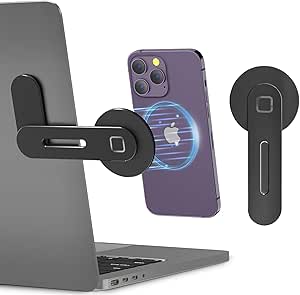 | Best for a Phone-and-Computer Workstation | Mounting type: Side mount | Material: Aluminum | Dimensions: 6.77 × 3.07 × 0.53 inches | VIEW ON AMAZON | See Our Full Breakdown |
| j5create Multi-Angle Aluminum Laptop Stand |  | Best for Adjustable Laptop Positioning | Material: Aluminum | Dimensions: 11.42 × 8.9 × 2.09 inches | Weight: 2.32 pounds | VIEW ON AMAZON | See Our Full Breakdown |
| Psitek Adjustable Aluminum Vertical Laptop Stand |  | Best for Clearing Desk Space | Material: 6061 aluminum | Adjustable slot width: 12–42 mm (0.5–1.65 inches) | Weight: 280 g (9.8 oz) | VIEW ON AMAZON | See Our Full Breakdown |
| Senetem 4-Pack Black Mouse Pads, 11 × 8.6 in |  | Best for a Shared Minimalist Setup | Pack quantity: 4 | Dimensions: 11 × 8.6 inches | Thickness: 2 mm | VIEW ON AMAZON | See Our Full Breakdown |
| Thibault Aluminum Laptop Stand for Desk – Ergonomic Cooling Design |  | Best Lightweight Laptop Stand | Brand: Thibault | Model number: Thibault-00 | Material: Aluminum alloy | VIEW ON AMAZON | See Our Full Breakdown |
| RECCAZR Wireless Keyboard and Mouse Combo – Avocado Green |  | Best Quiet Full-Size Set | Connectivity: 2.4 GHz wireless via USB nano receiver | Keyboard layout: QWERTY, 104 keys | Mouse DPI: 800, 1200, or 1600; adjustable | VIEW ON AMAZON | See Our Full Breakdown |
| DOLLAR BOSS 2-Pack Transparent Acrylic Monitor Memo Board (11″ x 3.1″) |  | Best for Visible Reminders | Brand: DOLLAR BOSS | Material: Transparent acrylic | Dimensions: 11 × 3.1 inches | VIEW ON AMAZON | See Our Full Breakdown |
| MoHern Large Felt Mouse Pad, 70 × 35 cm, Black |  | Best for a Unified Desk Surface | Brand: MoHern | Material: High-density felt | Color: Black-gray | VIEW ON AMAZON | See Our Full Breakdown |
| SOUNDANCE Aluminum Laptop Stand, 10–15.6 in, Gold |  | Best for a Simple, Elevated Setup | Brand: SOUNDANCE | Model: LS1 | Compatible screen size: 10–15.6 inches | VIEW ON AMAZON | See Our Full Breakdown |
| minimalist computer accessorie | Dimensions | Material | Weight |
|---|---|---|---|
| GleYo Aluminum Laptop Stand fo | 10.87 × 8.5 × 6 inches | Aluminum, metal, and plastic | 0.56 kg |
| VssoPlor Wireless Mouse | — | — | — |
| CloudValley Adjustable Laptop | 6.77 × 3.07 × 0.53 inches | Aluminum | 60 g |
| j5create Multi-Angle Aluminum | 11.42 × 8.9 × 2.09 inches | Aluminum | 2.32 pounds |
| Psitek Adjustable Aluminum Ver | 150 × 95 × 60 mm (6 × 3.5 × 2.4 inches) | 6061 aluminum | 280 g (9.8 oz) |
| Senetem 4-Pack Black Mouse Pad | 11 × 8.6 inches | — | 0.28 kg |
| Thibault Aluminum Laptop Stand | — | Aluminum alloy | 6.88 ounces |
| RECCAZR Wireless Keyboard and | — | — | 0.61 kg |
| DOLLAR BOSS 2-Pack Transparent | 11 × 3.1 inches | Transparent acrylic | — |
| MoHern Large Felt Mouse Pad | 70 × 35 cm | High-density felt | — |
| SOUNDANCE Aluminum Laptop Stan | 10.24 × 8.86 × 5.71 inches | 5 mm thick aluminum alloy | — |
More Details on Our Top Picks
GleYo Aluminum Laptop Stand for 10–16-Inch Laptops, Silver
The GleYo Aluminum Laptop Stand is a straightforward way to raise a laptop without adding a large permanent fixture to a minimalist desk. Its fixed 6-inch lift puts the screen higher, while the open U-shaped structure leaves space beneath the computer for airflow. Compared with the adjustable j5create Multi-Angle Aluminum Laptop Stand, GleYo offers fewer positioning choices but is lighter and designed to break down for compact storage. That makes it a better fit for people who pack away a shared desk or travel with their setup. The tradeoff is that its detachable parts need assembly, and the single lift height may not suit every chair or screen position. I’d choose it for portability, not fine-tuned ergonomics.
Pros:- Fits laptops from 10 to 16 inches
- Raises the laptop by 6 inches
- Open design promotes airflow beneath the device
- Detachable components pack away compactly
Cons:- Requires assembly before use
- Fixed lift height offers less positioning flexibility than the j5create stand
Best for: Laptop owners with 10–16-inch devices who want a raised screen and a stand that can be disassembled for storage or travel.
Not ideal for: People who frequently change their viewing angle or want a ready-to-use stand without assembly.
- Laptop compatibility:10–16 inches
- Lift height:6 inches
- Dimensions:10.87 × 8.5 × 6 inches
- Weight:0.56 kg
- Material:Aluminum, metal, and plastic
- Color:Silver
- Mounting type:Tabletop
Our verdict“Choose the GleYo if you want a portable, elevated laptop setup and can work with one fixed height.”
VssoPlor Wireless Mouse, 2.4G Slim Optical Mouse with USB Nano Receiver
The VssoPlor Wireless Mouse suits a pared-back desk where a quiet, compact pointer matters more than premium materials or extra controls. Its whisper-quiet clicks are a practical choice for shared offices and late-night work, while the small USB receiver stores inside the mouse for easier packing. The 2.4 GHz connection reaches up to 10 meters, giving it more freedom from the laptop than a wired mouse. Compared with the RECCAZR Wireless Keyboard and Mouse Combo in this roundup, this is the simpler choice if you only need a mouse, rather than a matching keyboard as well. The compromise is a plastic body and battery power instead of a rechargeable design. I’d pick it for quiet portability, but not for buyers seeking a more substantial feel.
Pros:- Quiet clicks suit shared workspaces
- Compact shape and stowable USB receiver support portability
- Works with Windows and Mac OS systems
- Automatic sleep mode helps conserve battery power
Cons:- Runs on batteries rather than charging by cable
- Plastic construction may feel less substantial than metal accessories
Best for: Students, remote workers, and shared-office users who want a compact mouse with quiet clicks and a stowable receiver.
Not ideal for: Buyers who prefer a rechargeable mouse, a metal finish, or a fuller-feeling body for extended use.
- Model:MS001
- Connectivity:2.4 GHz wireless
- Movement detection:Optical
- Buttons:3
- Wireless range:Up to 10 meters
- Hand orientation:Ambidextrous
- Power source:Battery powered
- Compatibility:Windows 7/8/10/XP/Vista and Mac OS X 10.4+
Our verdict“Pick the VssoPlor for a quiet, no-frills mouse that keeps a minimalist setup portable.”
CloudValley Adjustable Laptop Stand, Magnetic Phone Holder, Black
The CloudValley Magnetic Phone Holder takes a different route to minimalism: instead of adding a conventional laptop riser, it mounts a phone beside a laptop or monitor to keep a second screen close at hand. Its folding aluminum arm adjusts for viewing angle and collapses when not needed, while the magnetic attachment supports compatible phones and devices fitted with one of the included metal rings. Compared with the screen-lifting GleYo Aluminum Laptop Stand, CloudValley organizes a phone rather than changing the laptop’s height, so the two solve different desk problems. The adhesive side mount also calls for a smooth surface and a considered placement; it is less flexible to reposition than a freestanding accessory. Its listed maximum supported weight is 61 g, so I’d check device compatibility and weight before choosing it.
Pros:- Folding arm adjusts the phone viewing angle
- Aluminum construction has a slim, compact profile
- Magnetic attachment supports compatible phones and included metal rings for other phones or cases
- Designed for side mounting on laptops, monitors, tablets, and some vehicle screens
Cons:- Adhesive mounting is less convenient to reposition than a freestanding accessory
- Maximum listed weight capacity is 61 g
- Requires a compatible magnetic setup or use of an included metal ring
Best for: People who use a phone as a second screen and want it mounted beside a laptop or desktop monitor.
Not ideal for: Buyers who need a laptop riser, frequently rearrange their desk, or want a stand that works without adhesive mounting.
- Mounting type:Side mount
- Material:Aluminum
- Dimensions:6.77 × 3.07 × 0.53 inches
- Weight:60 g
- Maximum weight capacity:61 g
- Compatible devices:Desktop monitors, laptops, tablets, and phones
- Phone attachment:Magnetic; includes 2 metal rings
- Water resistance:Not water resistant
Our verdict“Choose CloudValley if keeping a phone visible beside your computer matters more than raising the laptop screen.”
j5create Multi-Angle Aluminum Laptop Stand
Among these laptop risers, the j5create Multi-Angle Aluminum Laptop Stand puts the most emphasis on flexible positioning. Adjustable height and viewing angles let buyers tune the screen position to their chair and desk, rather than accepting the GleYo stand’s fixed 6-inch lift. Its foldable design also makes it easier to store than a permanent desktop riser, and the aluminum build gives it a clean, pared-back look. The stand accommodates laptops up to 16 inches and can also hold tablets or books, which gives it broader use than a laptop-only accessory. That versatility comes with a 2.32-pound weight, making it less appealing for frequent travel than the lighter GleYo. I’d favor it for a home or office desk where adjustability matters more than carrying weight.
Pros:- Adjustable viewing angles and height support a more tailored screen position
- Foldable design supports storage and transport
- Aluminum construction suits a clean, minimal desk
- Can support laptops, tablets, and books
Cons:- Weighs 2.32 pounds, more than the portable GleYo stand
- Limited to laptops up to 16 inches
Best for: Desk-based laptop users who want to adjust screen height and viewing angle, including people who also use a tablet or book on the stand.
Not ideal for: Frequent travelers and owners of laptops larger than 16 inches who need a lighter or wider stand.
- Material:Aluminum
- Dimensions:11.42 × 8.9 × 2.09 inches
- Weight:2.32 pounds
- Maximum laptop size:16 inches
- Model:JTS127
- Manufacturer:j5create
- Adjustability:Adjustable height and viewing angles
- Design:Foldable
Our verdict“Choose the j5create if adjustable screen positioning is more important than having the lightest laptop stand.”
Psitek Adjustable Aluminum Vertical Laptop Stand
The Psitek Adjustable Aluminum Vertical Laptop Stand is for a minimalist desk that needs more open surface area, not a higher laptop screen. It holds a laptop upright in a 12–42 mm adjustable slot, letting the computer occupy less desk space when closed or connected to an external display. Tool-free screws make it possible to set the opening for different device widths, while silicone pads help guard against slipping and scratches. Compared with the j5create Multi-Angle Aluminum Laptop Stand, Psitek is more compact and better for storage, but it does not prop up a working laptop for direct viewing. Switching between devices may also call for readjusting the slot. I’d choose it for a docked laptop setup where clear desk space matters more than frequent, instant device changes.
Pros:- Stores a laptop upright to free desk surface
- Adjustable slot fits widths from 12 to 42 mm
- Silicone pads help prevent slipping and scratches
- 6061 aluminum build and open design support a tidy setup
Cons:- Tabletop design does not raise a laptop screen for direct use
- Slot may need readjustment when switching between devices
Best for: People who connect a laptop to an external monitor and want to store the computer upright to reclaim desk space.
Not ideal for: Anyone who needs to use the laptop screen while it sits in the stand or frequently swaps devices of different thicknesses.
- Material:6061 aluminum
- Adjustable slot width:12–42 mm (0.5–1.65 inches)
- Weight:280 g (9.8 oz)
- Dimensions:150 × 95 × 60 mm (6 × 3.5 × 2.4 inches)
- Finish:Sandblasted and anodized
- Compatibility:Laptops and MacBooks
- Adjustment:Tool-free quick-release screws
- Warranty:5 years
Our verdict“Choose the Psitek if your laptop stays docked and freeing desk space matters more than adjusting its screen position.”
Senetem 4-Pack Black Mouse Pads, 11 × 8.6 in
I’d pick the Senetem four-pack when a tidy desk means keeping each workstation equipped without adding visual clutter: the plain black finish blends in, and the compact footprint leaves more room than the MoHern Large Felt Mouse Pad. Its smooth polyester surface supports precise movement, while the rubber base helps keep it from wandering during use. Having four washable pads is useful for a household, office, or spare setup, rather than a single-user desk that needs one large continuous surface. The tradeoff is size: at 11 × 8.6 inches, it may feel cramped for broad mouse sweeps or for anyone who wants their keyboard and mouse on one mat. I’d choose MoHern for desk coverage and this set for simple, individual mouse zones.
Pros:- Four matching pads equip multiple desks or provide spares
- Smooth polyester surface supports controlled mouse movement
- Rubber backing helps limit slipping
- Washable construction is practical for shared work areas
Cons:- Compact dimensions restrict wide mouse movements
- Does not protect or unify the broader desk surface like the MoHern felt mat
Best for: Households or small offices that want matching, easy-care mouse pads for several compact workstations
Not ideal for: Low-sensitivity gamers and anyone who wants room for a keyboard and mouse on a single desk mat
- Pack quantity:4
- Dimensions:11 × 8.6 inches
- Thickness:2 mm
- Surface material:Polyester fiber
- Base material:Rubber
- Color:Black
- Weight:0.28 kg
- Warranty:1 year
Our verdict“Choose this set for understated, compact mouse surfaces across several workstations; choose the MoHern mat if you need full desk coverage.”
Thibault Aluminum Laptop Stand for Desk – Ergonomic Cooling Design
The Thibault aluminum stand suits a minimalist desk where raising the screen matters more than adding adjustment hardware or a built-in phone holder. Its ventilated design leaves airflow beneath the laptop, and the rubber pads help protect both device and desk. It supports laptops from 13 to 17.3 inches, a broader stated size range than the GleYo Aluminum Laptop Stand, which is listed for 10–16-inch machines. At just 6.88 ounces, it is easy to move between work surfaces, but that light build may feel less reassuring with a heavy gaming laptop. The description also does not specify height or angle adjustments, so buyers seeking a highly configurable setup may prefer the j5create Multi-Angle Aluminum Laptop Stand. This is a simple lift, not a full ergonomic workstation.
Pros:- Aluminum alloy construction gives the stand a clean, durable appearance
- Ventilated structure leaves space for airflow beneath the laptop
- Rubber pads help reduce scratches on the device and desk
- Tool-free assembly and low weight make it easy to reposition
Cons:- Lightweight build may not feel secure with very heavy laptops
- Only black is listed, limiting color matching
- Height and angle adjustment range is not specified, unlike the multi-angle j5create stand
Best for: Laptop users with a 13- to 17.3-inch device who want a lightweight, ventilated screen lift for a clean desk
Not ideal for: Owners of especially heavy gaming laptops or buyers who need adjustable viewing angles and detailed position control
- Brand:Thibault
- Model number:Thibault-00
- Material:Aluminum alloy
- Color:Black
- Compatible laptop sizes:13 to 17.3 inches
- Weight:6.88 ounces
- Mounting type:Tabletop
- Special features:Ergonomic design, ventilation, anti-scratch pads
Our verdict“Choose Thibault for a light, simple lift across a wide laptop-size range, but pick an adjustable stand if screen positioning is your priority.”
RECCAZR Wireless Keyboard and Mouse Combo – Avocado Green
For a pared-back desk that still needs a number pad, the RECCAZR combo replaces two separate peripherals with one coordinated wireless set. Its silent keys and quiet optical mouse make it better suited to shared rooms than a setup focused only on screen elevation, such as the Thibault laptop stand. One nano receiver serves both devices, saving a USB port, while the full-size 104-key layout keeps number entry and multimedia controls close at hand. The avocado green finish is a deliberate accent rather than a neutral match for every minimalist workspace. This set also relies on a USB receiver, not Bluetooth, and requires two AA batteries, so it is less convenient for users who prefer rechargeable or receiver-free gear. I’d choose it for quiet, straightforward desktop input, not a cable-free laptop bag.
Pros:- Quiet keyboard and mouse suit shared rooms and focused work
- One USB nano receiver connects both peripherals
- Full-size layout includes a numeric keypad and multimedia keys
- Works with Windows, Mac OS, Chrome OS, and Linux
Cons:- Requires two AA batteries rather than offering listed rechargeable power
- No Bluetooth option; both devices depend on the USB receiver
- Avocado green stands out more than the black or neutral accessories in this roundup
Best for: Home-office workers or students who need a quiet full-size keyboard, numeric keypad, and mouse for a shared workspace
Not ideal for: Bluetooth-only laptop users, rechargeable-device fans, or anyone seeking a restrained neutral color palette
- Connectivity:2.4 GHz wireless via USB nano receiver
- Keyboard layout:QWERTY, 104 keys
- Mouse DPI:800, 1200, or 1600; adjustable
- Power:2 AA batteries
- Compatible operating systems:Windows, Mac OS, Chrome OS, Linux
- Color:Avocado green
- Weight:0.61 kg
- Special features:Silent keys, tilt legs, auto-sleep mode, spillproof
Our verdict“Choose this set for quiet, full-size wireless input with one receiver, but skip it if Bluetooth or a neutral color scheme is essential.”
DOLLAR BOSS 2-Pack Transparent Acrylic Monitor Memo Board (11″ x 3.1″)
The DOLLAR BOSS memo boards add a place for short reminders without putting another opaque organizer on a minimalist desk. Their transparent acrylic keeps the screen area visually open, while the slim 11 × 3.1-inch format places notes near eye level. Compared with the Senetem mouse pads, these boards solve a different kind of desk clutter: paper notes around the display rather than accessories under the mouse. The two-piece pack can suit more than one screen, and no-trace adhesive is intended to peel away cleanly. Still, this is a screen-mounted organizer, not a fit for every workspace: adhesive strength can vary by surface, and placing notes on a board may not suit users who want a completely clear display area. No warranty is listed.
Pros:- Transparent acrylic preserves a visually open desk and screen area
- Two boards can organize notes beside separate screens
- No-trace adhesive is designed for removal without residue
- Slim dimensions keep the boards close to the display
Cons:- Adhesion may vary with screen and device surface texture
- No warranty is listed
- Visible notes may still add visual distraction for users who prefer a bare workspace
Best for: People who keep brief reminders or notes beside a monitor and want them visible without using a bulky desk organizer
Not ideal for: Users who want a completely clear screen area or have textured surfaces that may not hold adhesive reliably
- Brand:DOLLAR BOSS
- Material:Transparent acrylic
- Dimensions:11 × 3.1 inches
- Quantity:2 pieces
- Mounting type:No-trace adhesive
- Compatibility:PC monitors and laptops
- Model number:DB-ASNP-2PC
Our verdict“Choose these boards if you need reminders at eye level with little visual bulk, but skip them if adhesive placement or an uncluttered screen is a concern.”
MoHern Large Felt Mouse Pad, 70 × 35 cm, Black
The MoHern felt desk mat is the choice here for anyone who wants fewer separate surfaces: its 70 × 35 cm footprint can hold a laptop, keyboard, and mouse while helping shield the desk from scratches. That makes it a broader workspace layer than the Senetem four-pack, whose compact pads are easier to distribute across desks but do not unify a setup. The felt top and cushioned construction are suited to long sessions, and the rubberized-particle backing helps limit sliding. The tradeoff is commitment to a larger mat: it occupies more desk area and offers less flexibility than moving a small mouse pad around. The listed details also leave the exact thickness and material composition unspecified, so buyers seeking precise cushioning or a very thin surface have less to go on.
Pros:- Large footprint accommodates a laptop, keyboard, and mouse together
- Felt surface helps protect the desk from scratches
- Rubberized-particle backing helps keep the mat in place
- Cushioned surface may be more comfortable during extended use
Cons:- Takes up substantially more desk space than the Senetem individual pads
- Exact thickness and material composition are unspecified
- Single large mat is less convenient to distribute across multiple workstations
Best for: Desk users who want one dark surface for a laptop, keyboard, and mouse while protecting the desktop
Not ideal for: Small-desk owners or people who prefer a compact, washable mouse pad that can be moved between work areas
- Brand:MoHern
- Material:High-density felt
- Color:Black-gray
- Dimensions:70 × 35 cm
- Backing:Non-slip rubberized particles
- Compatible sensors:Optical and laser
- Manufacturer part number:002
- Number of items:1
Our verdict“Choose MoHern to create one protective surface for a complete desk setup; choose the Senetem set for compact pads across several stations.”
SOUNDANCE Aluminum Laptop Stand, 10–15.6 in, Gold
The SOUNDANCE LS1 suits a minimalist desk where a fixed, straightforward lift matters more than adjustability. Its 6-inch elevation raises a compatible laptop to improve the viewing angle, while the open frame leaves airflow around the computer and space underneath for small accessories. Compared with the CloudValley Adjustable Laptop Stand, this model has fewer positioning options and no phone holder, but its detachable three-piece design keeps setup and packing simple. The gold finish adds a visible accent, so it is less visually quiet than a silver or black stand. Its 10–15.6-inch compatibility range and 8.8-pound support limit also call for a check against your laptop before buying. I’d choose it for a compact, uncluttered workspace, not for a flexible multi-device station.
Pros:- Six-inch elevation can bring the screen closer to a comfortable viewing height.
- Open-frame aluminum design allows airflow around the laptop.
- Non-slip pads help limit movement on the desk.
- Tool-free, detachable three-piece construction is easy to assemble and carry.
Cons:- Fixed elevation offers less flexibility than the adjustable CloudValley stand.
- The 10–15.6-inch compatibility range excludes larger laptops.
- The 8.8-pound support limit may rule out some heavier devices.
Best for: Laptop users with a 10–15.6-inch computer who want a fixed six-inch lift, open airflow, and a detachable stand that can be packed away.
Not ideal for: Owners of laptops outside the listed size range, heavier devices over 8.8 pounds, or anyone who needs adjustable height or angle.
- Brand:SOUNDANCE
- Model:LS1
- Compatible screen size:10–15.6 inches
- Material:5 mm thick aluminum alloy
- Maximum supported weight:8.8 lbs
- Elevation:6 inches
- Dimensions:10.24 × 8.86 × 5.71 inches
- Item weight:0.9 kg
- Assembly:Detachable 3-piece, tool-free
Our verdict“Choose the SOUNDANCE LS1 if your laptop fits its size and weight limits and you want a portable, fixed-height lift without extra attachments.”

How We Picked
I ranked these accessories by how well they combine a restrained desk presence with a clear everyday purpose. I weighed usability, material and form, compatibility information, adjustability or storage benefits, and how much space each item occupies. I also considered maintenance and flexibility: a useful accessory should fit into a real setup without demanding extra pieces or creating a new source of clutter.
The ranking favors versatile pieces that improve a desk routine without requiring a specific workflow. That puts the adjustable j5create stand ahead of fixed or specialized laptop supports, while the wireless mouse and large felt pad offer different kinds of simplicity rather than competing for the same role. Compact pads and memo boards rank lower because their value depends more heavily on individual habits; the laptop-and-keyboard combinations also add more components, which may be useful but can make a setup feel less pared back.
Factors to Consider When Choosing Minimalist Computer Accessories
A minimalist setup is not just a set of matching objects; it is a workspace where each item earns its space. I would start with the friction you want to remove, then check whether an accessory solves it without adding a new footprint, cable, or maintenance task.
Start With the Desk Problem, Not the Aesthetic
Decide whether the main issue is screen height, limited surface area, loose notes, or a wired peripheral before choosing a product. A laptop stand and a vertical storage stand may both look spare, but one supports active use while the other frees space when the laptop is put away. Buying several visually consistent accessories at once can leave you with duplicates that do not solve a daily problem. Map the items already on your desk and identify what repeatedly gets in the way. The cleanest setup is often the one with fewer functions competing for attention.
Match Stand Style to How You Work
Adjustable stands suit people who change posture, share a desk, or need different screen angles during the day. A fixed or simpler stand can be less fussy if the laptop stays in one position and the screen height already works. Raising a laptop may make its built-in keyboard less comfortable to use for long sessions, so check whether you will need a separate keyboard and mouse. That extra equipment can improve the working position while taking up space and adding more visual elements. Think through the whole arrangement, not just the stand by itself.
Check Fit and Stability Before Choosing Aluminum
Aluminum gives many stands in this roundup a consistent, pared-back appearance, but a material match does not guarantee a good fit. Compare the stated laptop-size range with your device and look for a design that supports it securely in the way you plan to use it. A larger laptop or frequent typing directly on the machine can make stability more important than a slim profile. Check the desk surface too, since a stand that shifts or occupies too much depth can undermine a tidy layout. Avoid treating cooling claims as a replacement for checking fit, airflow, and your computer’s own thermal needs.
Choose Mouse Coverage for Your Actual Movements
A small mouse pad keeps a compact work area open, while a large mat gives both the mouse and other desk items a continuous surface. The four-pack format is useful if you want separate pads or a spare, but unused pieces become storage clutter. A large felt mat can visually unify a desk, yet it takes up more room and may need more care than a small pad. Measure the clear surface left after placing your keyboard and monitor before selecting a footprint. Also consider how easily the surface can be cleaned if your desk sees frequent food, drink, or craft materials.
Be Selective About Wireless and Combo Devices
A wireless mouse can remove a cable from the visible desk, but its receiver still needs a place and may occupy a port. A keyboard-and-mouse combo can reduce the task of matching peripherals, though it adds two devices and may be more than you need if your computer already has a suitable keyboard. Check what connection method your computer supports and whether you can spare a USB port before choosing a receiver-based model. Color can also affect the visual result: a distinctive accent may feel intentional, while a mismatch can make a minimal setup feel less cohesive. Favor the smallest set of functions that covers your regular work.
Keep Organization Accessories From Becoming More Clutter
Phone holders and memo boards help only when they replace a recurring reach or search, rather than simply adding another object to the workspace. A phone attachment can keep a device visible, but its placement should not interfere with the laptop or screen. Transparent memo boards reduce visual weight compared with opaque organizers, yet visible notes can still make a desk feel busy. Decide in advance what belongs on a board and clear outdated reminders regularly. If your notes already live digitally or your phone stays in a pocket, skip these add-ons and preserve the open surface.
Frequently Asked Questions
Which accessory should I buy first for a minimalist computer setup?
I would start with the item that solves the most persistent problem, rather than buying a coordinated set. If your laptop screen sits too low, a stand is likely to change the daily setup more than a decorative organizer. If cables are the main visual distraction, a wireless mouse may be the smaller first step. Measure your available desk area before adding a large mat or multiple accessories. Add another piece only after you know what remains inconvenient.
Is an adjustable laptop stand worth choosing over a simpler stand?
An adjustable stand makes sense when you change viewing angles, share a workspace, or need to reposition the screen through the day. If your laptop stays in one place, a less adjustable design may provide the cleaner, simpler solution. Remember that raising the screen can make the laptop keyboard less comfortable, so a separate keyboard may become part of the setup. That can improve posture but adds another object to manage. Choose adjustability for a real change in use, not just for the feature itself.
Should I choose a vertical laptop stand or a raised desk stand?
Choose a raised stand if you use the laptop screen while working and want to change its position. A vertical stand is better suited to storing a closed laptop upright and reclaiming desk space, usually alongside a separate monitor or another primary screen. These products solve different problems, so comparing them only by appearance can lead to the wrong purchase. Consider where the laptop will be during active work and where it will go when you are done. If you need both arrangements, check whether your desk has room to support each without crowding.
Will a large mouse pad make a small desk feel more minimalist?
A large mat can make a desk feel more unified by giving the mouse and nearby items one continuous surface. It can also consume much of a small work area, leaving less room for a notebook, mug, or keyboard movement. Measure your usable desk space with the monitor and keyboard in place before choosing a broad mat. A compact pad is easier to move and may preserve more open surface. Pick the larger format only if its coverage supports how you actually use the desk.
Do I need a wireless keyboard and mouse combo if I already own peripherals?
Not unless the combo solves a problem your current devices create, such as too many cables, mismatched controls, or a need for a coordinated set. Replacing functional peripherals just to make the desk look uniform can create unnecessary waste and extra devices. Check your computer’s ports and the combo’s connection method before deciding, since a USB receiver still needs a port. If the mouse alone is the source of cable clutter, replacing only that item is a more restrained choice. Keep existing gear that works unless the new setup offers a clear practical improvement.
Conclusion
For a single versatile starting point, I recommend the j5create Multi-Angle Aluminum Laptop Stand as the best overall pick because its adjustable design serves more working positions than a fixed stand. The Senetem four-pack is the best value for buyers who want several compact mouse surfaces, while the GleYo aluminum stand is a straightforward choice for someone who prefers a simple laptop riser without added accessories. For a premium-feeling desk focal point, the MoHern large felt mat suits buyers who have room for broad coverage; its size makes it a poor match for crowded desks. Beginners should start with one clearly useful item, such as the VssoPlor wireless mouse for reducing cable clutter, rather than buying a full setup at once. For specific needs, choose the Psitek vertical stand to store a laptop upright, the CloudValley stand if a built-in phone holder fits your routine, or the DOLLAR BOSS memo boards if visible reminders are part of your workflow.