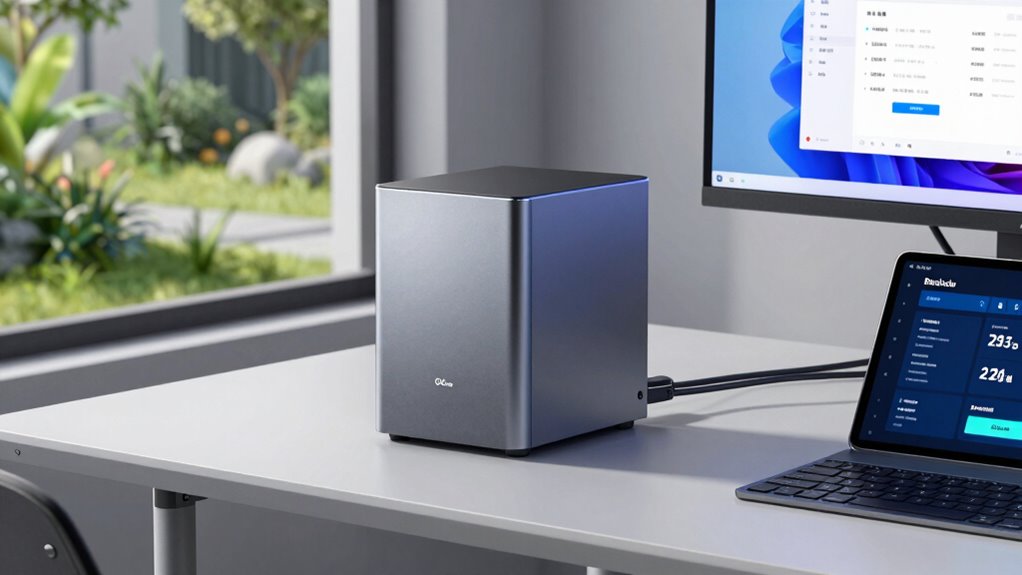
When choosing a NAS for home backup and file sharing, the main considerations are performance, ease of use, and expandability. The Synology DS223j stands out as the best overall for its balance of features and affordability. For those who want raw power, the UGREEN DXP4800 GT offers robust performance, especially for creators or small teams. However, buyers face tradeoffs between cost, complexity, and scalability. Continue reading for a detailed breakdown of these options to find the best fit for your home setup.

Get beauty and skincare favorites delivered free with Prime
- Fast, free delivery on millions of items
- Prime Video, Amazon Music and more included
- Member-only deals all year
Complete the kit



Key Takeaways
- The best NAS devices strike a balance between ease of use and technical capabilities, suitable for both beginners and power users.
- 4-bay models generally offer more flexibility and future expansion compared to 2-bay units, but at a higher cost.
- Pre-configured bundles with drives simplify setup but tend to be more expensive than diskless options paired with individual drives.
- Hardware transcoding and high CPU performance are key for media-heavy use cases, often found in more premium options.
- Price varies widely; budget models like the Buffalo LinkStation are suitable for simple backups, while premium units excel in remote access and multi-user environments.
| UGREEN NAS DXP2800 2-Bay for Advanced Home Users, Remote Workers & Creators |  | Best Overall for Power Users and Media Enthusiasts | Digital Storage Capacity: 80 TB | Hard Disk Interface: Serial ATA | Connectivity Technology: SATA | VIEW ON AMAZON | See Our Full Breakdown |
| UGREEN NAS DH2300 2-Bay Personal Storage for Beginners & Backup |  | Best for Beginners and Personal Backup | Capacity: Up to 64TB (drives not included) | Processor: High-performance processor | RAM: 4GB | VIEW ON AMAZON | See Our Full Breakdown |
| Synology DiskStation DS223j (Diskless) 2-Bay NAS |  | Best for Secure Private Cloud and Automated Backup | Number of Bays: 2 | Warranty: 2 years | Built-In Media: Yes | VIEW ON AMAZON | See Our Full Breakdown |
| Synology DS225+ Private Cloud Media Server – 2-Bay Diskless NAS with Intel CPU for Hardware Transcoding |  | Best for Media Streaming and Small Business Surveillance | Number of Bays: 2 | Processor: Intel CPU | Warranty: 3 Years | VIEW ON AMAZON | See Our Full Breakdown |
| UGREEN NAS DXP4800 GT 4-Bay for Creators, Tech Enthusiasts, and Office Teams |  | Best for High-Performance Multi-User Environments | Processor: AMD Ryzen Embedded R2514 | RAM: 8GB DDR4, expandable to 64GB | Storage Support: Up to 144TB | VIEW ON AMAZON | See Our Full Breakdown |
| Synology DS223 2-Bay Diskless NAS Home & Office Backup Hub | 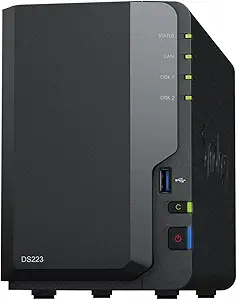 | Best Overall for Versatile Home & Office Backup & Surveillance | Model: DS223 | Type: 2-Bay NAS | Diskless: Yes | VIEW ON AMAZON | See Our Full Breakdown |
| TERRAMASTER F2-425 2-Bay NAS with Intel x86 Quad-Core CPU and 4GB RAM |  | Best for Performance & Multitasking in Compact Form | Processor: Intel x86 quad-core | RAM: 4GB | Storage Capacity: up to 60TB (2 x 30TB) | VIEW ON AMAZON | See Our Full Breakdown |
| Synology DS225+ 2-Bay DiskStation NAS Bundle with 8TB (2x 4TB Seagate IronWolf) |  | Best for Small Office & Flexible Storage Management | Processor: Intel Celeron J4125 Quad-Core | Memory: 2 GB DDR4 (expandable up to 6 GB) | Network Ports: 1 x 2.5 GbE, 1 x 1 GbE | VIEW ON AMAZON | See Our Full Breakdown |
| Synology DS425+ Private Cloud Media Server – 4-Bay Diskless NAS |  | Best for Data Sharing, Backup & Surveillance in Larger Capacity | Number of Bays: 4 | Network Speed: 2.5GbE | Warranty: 3 years | VIEW ON AMAZON | See Our Full Breakdown |
| Yxk Zero1 2-Bay Desktop NAS for Home & Personal Storage (Diskless) |  | Best for Beginners and Personal Data Security | Brand: Yxk | Number of Items: 1 | UPC: 751580777881 | VIEW ON AMAZON | See Our Full Breakdown |
| BUFFALO LinkStation 210 2TB 1-Bay NAS Network Attached Storage with HDD Included |  | Best for Simple Home Backup and File Sharing | Capacity: 2TB | Number of Bays: 1 | Included Drives: Yes | VIEW ON AMAZON | See Our Full Breakdown |
| UGREEN DXP4800 Plus 4-Bay NAS for Families, Creators & Small Teams |  | Best for Large Storage and Advanced Collaboration | Storage Capacity: Up to 144TB | Number of Bays: 4 | Network Ports: 10GbE, 10Gbps USB | VIEW ON AMAZON | See Our Full Breakdown |
| Synology BeeStation 4TB Personal Cloud Storage Device |  | Best for Easy Personal Cloud and File Sharing | Storage Capacity: 4TB | Device Type: Personal Cloud Storage | Connectivity: Web, Desktop, Mobile | VIEW ON AMAZON | See Our Full Breakdown |
| nas for home backup and file sharing | Warranty |
|---|---|
| UGREEN NAS DXP2800 2-Bay for A | — |
| UGREEN NAS DH2300 2-Bay Person | — |
| Synology DiskStation DS223j | 2 years |
| Synology DS225+ Private Cloud | 3 Years |
| UGREEN NAS DXP4800 GT 4-Bay fo | — |
| Synology DS223 2-Bay Diskless | 2 years |
| TERRAMASTER F2-425 2-Bay NAS w | — |
| Synology DS225+ 2-Bay DiskStat | — |
| Synology DS425+ Private Cloud | 3 years |
| Yxk Zero1 2-Bay Desktop NAS fo | 2 Years |
| BUFFALO LinkStation 210 2TB 1- | 2 years |
| UGREEN DXP4800 Plus 4-Bay NAS | 2 years |
| Synology BeeStation 4TB Person | — |
More Details on Our Top Picks
UGREEN NAS DXP2800 2-Bay for Advanced Home Users, Remote Workers & Creators
The UGREEN NAS DXP2800 stands out for its immense storage capacity, supporting up to 80TB across multiple drives, making it ideal for those managing large media libraries or virtual environments. Its high-performance hardware, including a 7200 rpm HDD compatibility and SATA 6.0 Gb/s, allows for fast data access and heavy workloads—surpassing the capabilities of simpler NAS units like the Synology DS223j. The built-in AI surveillance features add value for users wanting integrated security, though the setup involves selecting compatible drives and managing a more complex system. Compared to the DS225+, which is more energy-efficient but less powerful, this model caters to users needing raw performance and expandability at the expense of ease of use.
Pros:- Supports up to 80TB of storage with multiple drive bays
- Powerful hardware suitable for media servers and virtual machines
- AI-powered surveillance features enhance home security
- Compatible with various operating systems and devices
Cons:- Requires purchasing drives separately, adding to initial cost
- Setup may be challenging for non-technical users
- Plastic enclosure could affect durability over time
Best for: Advanced home users, creators, and media professionals needing high capacity and robust performance.
Not ideal for: Casual users or those unfamiliar with hardware configuration, as setup and drive management can be complex.
- Digital Storage Capacity:80 TB
- Hard Disk Interface:Serial ATA
- Connectivity Technology:SATA
- Hard Disk Form Factor:3.5 inches
- Data Transfer Rate:334 megabits_per_second
- Hardware Connectivity:Ethernet, SATA 6.0 Gb/s, USB
Our verdict“This NAS is best suited for tech-savvy users who need serious storage and performance for media and security applications.”
UGREEN NAS DH2300 2-Bay Personal Storage for Beginners & Backup
The UGREEN NAS DH2300 offers a simple, straightforward solution for personal file sharing and backups, making it ideal for those new to NAS systems. Its automatic backup features and AI photo organization simplify digital life for users who want reliable storage without fuss. While it lacks native Wi-Fi support, requiring an external USB adapter, it compensates with easy setup and robust security protocols like RAID, two-factor authentication, and encrypted transfers. Unlike the more advanced Synology DS225+, which supports virtual machines and Docker, this model focuses purely on ease of use and personal data management, making it less suitable for those needing extensive customization or multitasking capabilities.
Pros:- Very easy to set up and operate for beginners
- Supports automatic backups across multiple devices
- AI-powered photo tagging and organization
- Strong security features for personal data
Cons:- Requires external adapter for Wi-Fi, reducing convenience
- Limited to basic use, not suitable for enterprise or heavy workloads
- No support for Docker or virtual machines
Best for: Home users seeking a simple, secure, and automatic backup solution without technical complexity.
Not ideal for: Power users or small business owners who need advanced features or virtualization support.
- Capacity:Up to 64TB (drives not included)
- Processor:High-performance processor
- RAM:4GB
- Network:1GbE port
- File transfer speed:125MB/s
- Security features:RAID, two-factor authentication, encrypted transfers
Our verdict“This NAS makes the most sense for newcomers who want reliable, secure personal storage without complexity.”
Synology DiskStation DS223j (Diskless) 2-Bay NAS
The Synology DS223j excels as a compact, energy-efficient private cloud hub for small households or home offices. Its two-bay design limits maximum storage, but it compensates with Synology’s intuitive DSM OS, making setup approachable even for users unfamiliar with NAS systems. It supports automated backups, multi-platform access, and surveillance features, similar to the more versatile DS225+, but with less raw power and fewer bays. Its energy efficiency and quiet operation make it suitable for everyday home use, though storage capacity might be limited for heavy media libraries or larger backups.
Pros:- Creates a secure private cloud for easy sharing and backup
- Supports automated backups for multiple devices
- Energy-efficient and quiet operation
- Includes surveillance capabilities
Cons:- Limited to two bays, restricting total storage
- Requires network setup and familiarity with NAS management
- Some advanced features require additional configuration
Best for: Home users prioritizing data security and automation with simple setup and low power consumption.
Not ideal for: Power users or those needing large storage capacity or extensive virtualization options.
- Number of Bays:2
- Warranty:2 years
- Built-In Media:Yes
- Energy Efficiency:Yes
- Supported Systems:Windows, iOS, Android, macOS
- Connectivity:Ethernet
Our verdict“This NAS is perfect for users seeking a straightforward, secure cloud solution for personal data and small-scale surveillance.”
Synology DS225+ Private Cloud Media Server – 2-Bay Diskless NAS with Intel CPU for Hardware Transcoding
The Synology DS225+ offers a compelling option for media enthusiasts and small business users who need more than basic backup. Its Intel CPU supports hardware transcoding of 4K media, making it ideal for streaming high-resolution content across devices. The fast transfer speeds up to 282 MB/s and multi-layered data protection, including RAID and snapshots, make it suitable for those managing valuable media collections or small-scale surveillance systems—supporting up to 30 IP cameras. Compared to the DS223j, its added processing power justifies the higher complexity and cost for users who require multimedia handling and reliable data security, though the diskless design demands additional drive purchases.
Pros:- Supports 4K media streaming and hardware transcoding
- Fast transfer speeds up to 282 MB/s
- Supports up to 30 IP cameras for surveillance
- Multi-layered data protection with RAID and snapshots
Cons:- Requires purchasing drives separately, adding cost
- Limited to 2 bays, restricting maximum storage
- Advanced features may need technical setup
Best for: Home media lovers and small businesses needing high-quality streaming and surveillance capabilities.
Not ideal for: Users seeking a plug-and-play solution or with limited technical knowledge, due to setup complexity.
- Number of Bays:2
- Processor:Intel CPU
- Warranty:3 Years
- Transfer Speed:282 MB/s
- Supports Cameras:Up to 30
- Diskless:Yes
Our verdict“Ideal for multimedia-focused users who need robust streaming, security, and surveillance features in a compact form.”
UGREEN NAS DXP4800 GT 4-Bay for Creators, Tech Enthusiasts, and Office Teams
The UGREEN DXP4800 GT is built for demanding users needing extensive storage and multitasking. Powered by an AMD Ryzen Embedded R2514 with 4 cores and support for up to 144TB of total storage, it surpasses smaller NAS options like the DS225+ in capacity and processing power. Its dual 10GbE ports enable rapid data transfer suitable for offices or creative workflows involving large files. The inclusion of features like Docker, virtual machines, and surveillance makes it versatile, though drives are sold separately, and the setup can be complex for less experienced users. For businesses or power users, this NAS offers exceptional expandability and performance, but it may be overkill for simple backups or casual file sharing.
Pros:- Powerful AMD Ryzen quad-core processor
- Supports up to 144TB storage with multiple drives
- Dual 10GbE ports for fast network connectivity
- Supports Docker, VMs, and surveillance
Cons:- Drives not included, increasing initial investment
- Setup complexity for non-technical users
- Pre-installed RAM is non-ECC, limiting error correction
Best for: Small teams, content creators, and tech-savvy professionals needing high-speed, large-capacity storage and multitasking capabilities.
Not ideal for: Casual users or those without technical expertise, as setup and maintenance can be demanding.
- Processor:AMD Ryzen Embedded R2514
- RAM:8GB DDR4, expandable to 64GB
- Storage Support:Up to 144TB
- Network:Dual 10GbE ports
- Connectivity:USB 3.2, HDMI, SD card
- Security:TLS/SSL, AES, RAID
Our verdict“This NAS is tailored for professionals and small businesses needing maximum performance, expandability, and multitasking features.”
Synology DS223 2-Bay Diskless NAS Home & Office Backup Hub
The Synology DS223 stands out as a well-rounded solution for those seeking a central hub for data, collaboration, and basic surveillance. Unlike the DS225+ with its bundled storage and more robust network features, the DS223 offers greater flexibility for users who prefer to select their own drives and customize their setup. Its support for remote camera monitoring expands its utility beyond simple file sharing. However, the need to purchase disks separately and the limited 2-bay capacity mean it might not suit those with very large storage needs or less technical familiarity. Still, its balance of features and affordability makes it a strong choice for users who want a straightforward, expandable system that can grow with their needs.
Pros:- Centralizes data from multiple devices for easy access
- Supports professional file collaboration and version control
- Automated backup for various devices including cloud and external drives
- Transforms IP cameras into a surveillance system with remote monitoring
Cons:- Requires purchasing disks separately, increasing initial cost
- May have a learning curve for users unfamiliar with NAS setups
- Limited to 2 drive bays, restricting maximum storage expansion
Best for: Home users or small office teams wanting flexible, centralized backup and basic surveillance capabilities.
Not ideal for: Users needing large-scale storage or a ready-to-go system with bundled drives and minimal setup complexity.
- Model:DS223
- Type:2-Bay NAS
- Diskless:Yes
- Warranty:2 years
Our verdict“This NAS is best suited for users who want a flexible, feature-rich backup and surveillance hub with room to grow.”
TERRAMASTER F2-425 2-Bay NAS with Intel x86 Quad-Core CPU and 4GB RAM
The TERRAMASTER F2-425 is a compelling choice for users needing robust performance in a compact 2-bay design. Its Intel x86 quad-core processor and 4GB RAM deliver enough power for 4K transcoding, multitasking, and multi-user access, outperforming more basic options like the Synology DS225+ in processing capability. Its quiet operation and easy-to-use tool-free HDD trays make it accessible for home or small office environments. The main tradeoff is its limited capacity of only 2 drive bays, which may restrict long-term storage expansion, and it requires users to supply their own disks. Overall, it makes sense for those who value raw performance and quiet operation over maximum storage capacity.
Pros:- Powerful performance with quad-core CPU and 4GB RAM
- Supports 4K hardware decoding and multi-user access
- Quiet operation at just 19dB
- Easy HDD installation with tool-free trays
Cons:- Limited to 2 drive bays, which restricts maximum storage
- Requires network setup for full functionality
- No included drives, diskless setup
Best for: Tech-savvy home users or small teams needing high-performance multitasking and media transcoding.
Not ideal for: Users seeking large, scalable storage or those uncomfortable with hardware setup and management.
- Processor:Intel x86 quad-core
- RAM:4GB
- Storage Capacity:up to 60TB (2 x 30TB)
- Network:2.5GbE port
- Noise Level:19dB(A)
- HDD Tray:Tool-free Push-Lock
Our verdict“This NAS suits users who prioritize performance and quiet operation over maximum storage capacity.”
Synology DS225+ 2-Bay DiskStation NAS Bundle with 8TB (2x 4TB Seagate IronWolf)
The Synology DS225+ offers a balanced setup for small offices or home users who want to start with reliable storage. Unlike the DS223, it comes with bundled drives, simplifying initial setup, and features dual 2.5-Gigabit Ethernet ports that provide faster network speeds. Its support for flexible RAID and advanced snapshot technology allows for better data protection and recovery, making it suitable for users with critical data. While its 2-bay limit is comparable to the DS223, the expandable memory up to 6GB and included drives make it an attractive starter for those who need a reliable, expandable system without a steep learning curve. However, it still doesn’t support large-scale storage expansion beyond two disks.
Pros:- Supports flexible storage management with SHR and snapshot technology
- Dual 2.5-Gigabit Ethernet ports for faster network connectivity
- Expandable memory up to 6 GB for better performance
- Includes 8TB pre-installed storage
Cons:- Limited to 2 drive bays, restricting storage expansion
- Memory is non-ECC, less ideal for critical data
- Additional drives needed for larger storage capacity
Best for: Small business or home office users prioritizing flexible storage management and fast networking.
Not ideal for: Those needing extensive storage beyond two drives or a system with more hardware expansion options.
- Processor:Intel Celeron J4125 Quad-Core
- Memory:2 GB DDR4 (expandable up to 6 GB)
- Network Ports:1 x 2.5 GbE, 1 x 1 GbE
- Drive Bays:2
- Supported Drives:SATA hard drives or SSDs
- Bundled Storage:8TB (2x 4TB Seagate IronWolf)
Our verdict“This NAS is well-suited for users needing reliable, expandable storage with fast network access in a small setup.”
Synology DS425+ Private Cloud Media Server – 4-Bay Diskless NAS
The Synology DS425+ offers a significant step up in capacity and features, with four bays ideal for users who need robust data sharing, backup, and surveillance. Its quad-core Intel CPU and 2.5GbE ports ensure high-speed transfers and smooth multi-user access, surpassing the two-bay models like the DS225+ in scalability. The 4-bay design provides more room for data growth and RAID configurations, making it suitable for users with expanding storage needs or small teams. The main drawback is that it requires technical knowledge to configure and manage effectively, and as a diskless unit, users must invest in drives separately. It’s a smart choice for those who want a versatile, high-capacity network storage system.
Pros:- High-speed data transfer with 2.5GbE networking
- Supports multiple users and concurrent access
- Robust data protection with RAID, snapshots, and backups
- Ideal for data sharing, backup, and surveillance
Cons:- Requires technical knowledge for setup and management
- No pre-installed drives, additional purchase needed
- Overkill for users with basic storage needs
Best for: Small offices or media-heavy households needing larger storage capacity and advanced data sharing features.
Not ideal for: Beginners or users with minimal storage needs who prefer a pre-configured system with drives included.
- Number of Bays:4
- Network Speed:2.5GbE
- Warranty:3 years
- Model Number:DS425+
- UPC:846504005994
Our verdict“This NAS is best for users needing scalable, high-capacity storage with advanced sharing and backup features.”
Yxk Zero1 2-Bay Desktop NAS for Home & Personal Storage (Diskless)
The Yxk Zero1 provides an accessible entry point for personal users who want secure, private storage for files, photos, and videos. Its simple setup and 2.5GbE connectivity make it appealing for beginners, especially those interested in Docker support and private cloud solutions. Compared to the Synology DS225+, it offers more flexibility with features like Docker and encryption, but its limited capacity of 2 bays could be restrictive over time. The absence of included drives means initial costs are higher, and more technically inclined users may find setup less intuitive than Synology’s ecosystem. Still, for personal use, it offers a good mix of security, speed, and straightforward access.
Pros:- Easy to set up and operate for beginners
- Fast data transfer with 2.5GbE connectivity
- Supports Docker for advanced customization
- Secure private cloud with encryption and permissions
Cons:- Hard drives must be purchased separately, increasing initial costs
- Limited to 2 bays, restricting storage expansion
- No included hard drives
Best for: Home users seeking a secure, easy-to-use personal storage solution with Docker capabilities.
Not ideal for: Power users or those with large storage needs who require more than 2 bays or pre-installed drives.
- Brand:Yxk
- Number of Items:1
- UPC:751580777881
- RAM:4GB
- Connectivity:2.5GbE
- Supported Features:Docker Support, Private Cloud, File Sharing, Remote Access, Phone Backup
- Warranty:2 Years
- Weight:2 kg
Our verdict“This NAS is ideal for personal users prioritizing security, ease of use, and flexibility with Docker support.”
BUFFALO LinkStation 210 2TB 1-Bay NAS Network Attached Storage with HDD Included
This model stands out for its straightforward setup and reliable performance for basic home users. Unlike the Synology BeeStation, which offers more advanced features like cross-device sync and cloud backups, the Buffalo LinkStation 210 keeps things simple with a built-in hard drive and easy centralized storage. Its 2TB capacity limits scalability, making it less suitable for larger families or users with extensive media libraries. While the included drives and 2-year warranty provide peace of mind, the device’s basic features and compatibility with only older macOS versions restrict its appeal for more tech-savvy users seeking advanced options. This pick makes the most sense for those who want a plug-and-play, reliable storage device without the need for extra features or expansion.
Pros:- Easy to set up and use for centralized storage
- Supports secure file sharing and automated backups
- Includes hard drives and offers a 2-year warranty
Cons:- Limited to 2TB capacity, restricting growth
- Basic features compared to more advanced NAS options
Best for: Home users seeking a straightforward, all-in-one backup solution with minimal setup.
Not ideal for: Power users or households with large media libraries needing extensive storage or advanced features.
- Capacity:2TB
- Number of Bays:1
- Included Drives:Yes
- Compatibility:Windows, macOS
- Support:24/7 US-based
- Warranty:2 years
Our verdict“This NAS is ideal for casual home users who want reliable, simple backup and file sharing without extra complexity.”
UGREEN DXP4800 Plus 4-Bay NAS for Families, Creators & Small Teams
The UGREEN DXP4800 Plus excels for users who need serious storage capacity and versatility. Its 4-bay design supports up to 144TB, making it a clear choice over the Synology BeeStation for large media libraries, or the Buffalo for small-scale backups. Its support for virtual machines, Docker containers, and fast 10GbE connections make it suitable for small teams and tech-savvy users who want more than just simple storage. However, the need to purchase hard drives separately and its wired-only network support could complicate setup for some households. Compared with the Synology BeeStation’s ease of use, this model prioritizes performance and expandability at the expense of simplicity and immediate out-of-the-box readiness. It’s best for those who value high capacity and advanced features over plug-and-play convenience.
Pros:- Supports up to 144TB storage capacity
- Enables virtual machines and Docker for advanced use
- Fast transfer speeds with 10GbE and USB ports
- Secure with encryption and permission controls
Cons:- Hard drives are not included, increasing overall cost
- Requires wired Ethernet, no Wi-Fi support
- Setup can be more complex for beginners
Best for: Small teams, creators, and households with large data needs who want robust, expandable storage and virtualization support.
Not ideal for: Less technical users or those seeking a simple, ready-to-use solution with included drives and Wi-Fi support.
- Storage Capacity:Up to 144TB
- Number of Bays:4
- Network Ports:10GbE, 10Gbps USB
- Compatibility:Windows, macOS, Linux, iOS, Android, Google
- Hard Drives Included:No
- Warranty:2 years
Our verdict“This NAS makes the most sense for users who need large-scale storage, virtualization, and high-speed data transfer, accepting some setup complexity.”
Synology BeeStation 4TB Personal Cloud Storage Device
The Synology BeeStation offers a user-friendly approach to personal cloud storage, ideal for those who want hassle-free access to files across devices. Its simple setup via QR code and its ability to sync, share, and backup make it appealing to less technical users or small households. While its 4TB capacity provides a decent starting point, it falls short for households with extensive media libraries or large backup needs, especially compared to the 144TB capacity of the UGREEN DXP4800 Plus. Unlike the Buffalo LinkStation, which is more basic, the BeeStation supports cloud backups from multiple services, adding versatility. However, it requires an active network connection for access, limiting offline usability. This device is best suited for users prioritizing convenience and easy access over high storage capacity or advanced features.
Pros:- Easy setup with QR code
- Accessible from multiple devices
- Supports backups from popular cloud services
Cons:- Limited storage capacity for large data needs
- Requires network connection for access
- Less suitable for extensive media libraries
Best for: Individuals or small households seeking a simple, accessible personal cloud system with easy setup and mobile access.
Not ideal for: Power users needing large-scale storage or advanced virtualization features, or households with extensive data needs.
- Storage Capacity:4TB
- Device Type:Personal Cloud Storage
- Connectivity:Web, Desktop, Mobile
- Features:File sharing, editing, cross-device sync
- Backup Support:Cloud services
- Compatibility:Multiple devices
Our verdict“This NAS is a strong choice for users who want quick, easy access to their files without complex setup or high capacity needs.”

How We Picked
These NAS devices were selected based on a combination of performance, ease of setup, expandability, build quality, and value. Priority was given to products that offer reliable data backup, seamless file sharing, and user-friendly interfaces for a home environment. We also considered the versatility of features such as media transcoding, remote access, and support for multiple drives. The ranking reflects a balance between cost and capability, aiming to help both novice users and experienced enthusiasts find suitable options.Factors to Consider When Choosing Nas For Home Backup And File Sharing
Choosing the right NAS for home backup and file sharing involves evaluating several key factors. Beyond basic features, consider how the device will fit into your existing network, future expansion plans, and specific use cases like media streaming or remote access. Making informed decisions can prevent overpaying for features you don’t need or ending up with a model that lacks necessary capabilities. Let’s explore the main considerations to help you identify the best fit.Number of Bays and Expandability
The number of bays determines how many drives you can install, affecting both storage capacity and redundancy options. Two-bay models are typically less expensive and simpler, ideal for basic backups. Four-bay options provide room for RAID configurations and easier scalability as your storage needs grow. Think about your current requirements and future expansion plans to select a device that won’t limit your setup down the line.
Performance and CPU Power
Performance matters most if you plan to stream high-definition media, run multiple users, or use advanced features like hardware transcoding. Look for NAS models with at least a quad-core processor and sufficient RAM—usually 2GB or more—to handle multiple tasks smoothly. Cheaper or lower-spec models may struggle under load, leading to slow transfers or buffering issues, especially with media-rich content.
Ease of Use and Software Ecosystem
An intuitive interface and reliable software ecosystem can make or break your experience. Synology’s DiskStation Manager, for example, is widely praised for simplicity and robust app support, making setup and daily use straightforward. Conversely, some less popular brands may lack regular updates or user-friendly apps, which can increase maintenance time and reduce reliability. Prioritize models with good reviews for ease of setup and ongoing support.
Price and Total Cost of Ownership
Initial cost is just one part of the equation. Budget models like the Buffalo LinkStation are appealing for simple backups but may lack features you want later. Pre-filled bundles with drives cost more upfront but can save time and reduce compatibility issues. Consider long-term costs, including potential drive upgrades, replacement parts, or subscription services for cloud features, to determine true value for your money.
Media and Remote Access Capabilities
If streaming media or accessing files remotely is a priority, look for NAS units with hardware transcoding, dual-band Wi-Fi, or remote access apps. Devices like the Synology DS225+ excel here, supporting high-quality media streaming and easy remote management. Cheaper models may lack these features, limiting flexibility for media-heavy households or those working remotely often.
Frequently Asked Questions
Can I use a NAS for backing up multiple devices at once?
Absolutely. Most modern NAS devices support multiple users and can back up data from several computers, smartphones, or tablets simultaneously. Features like multi-user access, scheduled backups, and cloud sync options make it simple to centralize your data. Ensure the NAS has adequate performance (CPU and RAM) to handle multiple backup streams without slowing down your network.
Is a 2-bay NAS enough for my home storage needs?
A 2-bay NAS can be sufficient for basic backup and file sharing, especially if your storage needs are modest. They are generally more affordable and easier to set up. However, they lack expandability and redundancy options found in larger models. If you anticipate needing more storage or want more protection against drive failure, considering a 4-bay model might be worth the extra investment.
How important is hardware transcoding for a home NAS?
Hardware transcoding accelerates media streaming by converting video files into playable formats on-the-fly, which is especially useful for households with multiple media devices. If streaming high-definition or 4K content to various devices is a priority, choosing a NAS with a dedicated transcode engine or a powerful CPU is advisable. Without it, media playback may be slower or require more buffering.
Should I buy a diskless NAS or one with drives pre-installed?
Buying a diskless NAS offers flexibility to choose drives suited to your needs and upgrade later, usually at a lower initial cost. Pre-installed drives simplify setup and often come with warranties, but they tend to be more expensive overall. Consider your technical comfort level and future plans—if you want a quick, hassle-free start, a pre-filled bundle might be preferable.
What features should I prioritize for remote access and security?
Secure remote access is vital for accessing your files from anywhere. Look for NAS devices supporting VPN, two-factor authentication, and secure cloud sync options. Regular firmware updates and encryption are also key to maintaining security. Devices with dedicated apps or web portals that support remote login help streamline access while maintaining safety.
Conclusion
For most home users, the Synology DS223j offers an excellent blend of affordability, ease of use, and reliable performance, making it ideal for beginners or those with modest storage needs. The UGREEN DXP4800 GT is better suited for tech enthusiasts or media-heavy households needing powerful hardware transcoding and expandability. Budget-conscious buyers should consider the Buffalo LinkStation 210 for simple backups, while advanced users or small teams might prefer the UGREEN DXP4800 GT or Synology DS225+ for their scalability and media features. Ultimately, your choice depends on your current needs and future plans, but these options provide a clear starting point for a reliable home backup and file sharing setup.