Using cloud storage with organized, calm folders helps you centralize your files, making everything easier to find and manage. It enables you to access your documents from any device, keeping your digital space tidy and stress-free. Good organization, clear labeling, and secure sharing features turn chaos into calm, boosting your productivity and peace of mind. Keep going to discover simple tips that can transform your digital environment even further.
Key Takeaways
- Organize files into clearly labeled folders to create a calm, clutter-free digital workspace.
- Use logical folder structures to separate work, personal, and project files for easy access.
- Implement consistent naming conventions and tagging to streamline file retrieval and reduce stress.
- Leverage cloud features like automatic syncing and version history to maintain order and security.
- Regularly review and clean folders to prevent digital overload and maintain a peaceful file environment.

In today’s digital world, managing your files can feel overwhelming, but cloud storage offers a simple solution. With so many documents, photos, and projects piling up, it’s easy to lose track or spend valuable time searching for that one important file. Cloud storage helps you streamline your digital life by providing a centralized place to keep everything organized and accessible from any device. When you prioritize good file organization, you can quickly find what you need, avoid clutter, and boost your productivity. Creating a logical folder structure—like separating work documents from personal files—makes navigation straightforward. Plus, cloud services often allow you to label or tag files for even faster retrieval. This kind of systematic approach guarantees your digital workspace remains calm and manageable.
Streamline your digital life with organized, accessible files and smart cloud storage solutions.
Storage security is another major benefit of using cloud storage. You want to protect your sensitive information from threats like hacking, data loss, or accidental deletion. Reputable cloud providers invest heavily in security measures, such as encryption during data transfer and at rest, multi-factor authentication, and regular security audits. These features give you peace of mind that your files are safe, even if your device is lost or stolen. Many services also offer version history, so if you accidentally overwrite a file or need to retrieve an earlier draft, it’s readily available. With cloud storage, you don’t have to worry about physical damage to your hard drive or losing important files due to hardware failure. Instead, your files are stored securely offsite, protected by layers of security protocols.
Additionally, cloud storage makes it easier to keep your files organized over time. As your collection grows, it’s tempting to let clutter build up, but with features like automatic syncing and folder sharing, you can stay on top of your digital files. You can set up specific folders for ongoing projects or recurring tasks, and the cloud will keep everything synchronized across your devices. This eliminates the chaos of managing multiple versions or duplicated files. Secure sharing options also mean you can collaborate seamlessly with colleagues or friends without compromising your data’s safety. All these tools work together to create a calm, efficient digital environment, reducing stress and allowing you to focus on what truly matters.
Furthermore, adopting a systematic approach to file organization and security aligns with best practices for digital management and helps prevent data breaches or accidental data loss. Ultimately, embracing cloud storage with a focus on good file organization and storage security helps you maintain control over your digital life. It transforms a chaotic collection of files into a streamlined, secure system that’s easy to navigate and protected from threats. Instead of wasting time hunting for misplaced documents or worrying about data breaches, you can confidently rely on your cloud setup. This peace of mind supports a more productive, less stressful work and personal life, giving you the freedom to focus on your goals instead of digital clutter.
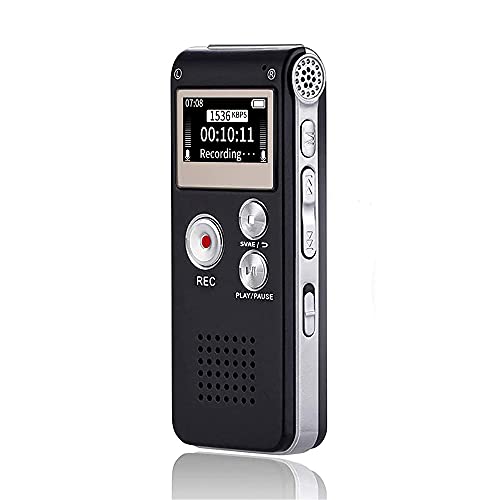
Digital Voice Recorder 16GB Voice Recorder with Playback for Lectures - USB Rechargeable Dictaphone Upgraded Small Tape Recorder Device
【Simple Operation】- switch on your voice recorder, one button for recording. press the "REC", start the recording, press...
As an affiliate, we earn on qualifying purchases.
Frequently Asked Questions
How Secure Is Calm Folders’ Cloud Storage?
Calm Folders’ cloud storage is quite secure. You benefit from data encryption both during transfer and at rest, which keeps your information protected from unauthorized access. Additionally, you have access controls that let you set permissions and restrict who can view or edit your files. These security measures work together to guarantee your data stays private and safe from potential threats, giving you peace of mind.
Can Calm Folders Integrate With Other Apps?
Did you know over 80% of users find app compatibility essential? Calm Folders easily integrates with third-party apps, making your workflow smoother. You can connect it with popular tools like Google Drive, Dropbox, or Slack, streamlining your document management and collaboration. This seamless integration helps you stay organized and efficient, ensuring you get the most out of your existing apps without any hassle.
What Is the Pricing Structure for Calm Folders?
Calm Folders offers a straightforward pricing structure with tiered subscription costs. You can choose from basic, standard, or premium plans, each providing different features and storage limits. The pricing tiers are designed to fit various needs, so you only pay for what you use. Subscription costs vary depending on the plan you select, making it easy to find an option that suits your budget while maximizing your organization.
How Does Calm Folders Handle Data Backups?
Imagine your data doing a happy dance, knowing it’s safe with Calm Folders. They handle backups automatically, so you don’t have to worry about losing files in a digital hurricane. With data redundancy built-in, your information is stored in multiple locations, like a well-prepared squirrel hoarding nuts. You get peace of mind, knowing your data is backed up seamlessly and ready to bounce back in case of mishaps.
Is Calm Folders Suitable for Enterprise Use?
Yes, Calm Folders is suitable for enterprise use. Its user interface is intuitive, making file sharing straightforward for teams of any size. You can easily organize, access, and collaborate on documents securely, which is essential for business environments. Plus, its robust features support enterprise-level security and compliance, ensuring your data remains protected while streamlining workflow and boosting productivity across departments.

Professional 264GB WUCOTC Digital Voice Recorder - Voice Activated Recorder for Lectures Meetings - 18000 Hours Recording Device with Playback, MP3 Player, Password Protection, Variable Speed, Black
【Studio-Grade Clarity with AI Noise Cancellation】Equipped with a 3rd-gen industry-leading audio chip, this recorder delivers 1536kbps HD stereo...
As an affiliate, we earn on qualifying purchases.
Conclusion
With cloud storage and calm folders, you gain not only organization but peace of mind. Did you know that 60% of users report increased productivity after decluttering their digital files? By simplifying your digital space, you save time and reduce stress. Embrace these tools to keep your files tidy and your mind clear. Remember, a well-organized digital life isn’t just easier—it’s essential for staying focused and efficient every day.

Zoom H1 XLR 2-Channel Recorder for Musicians, Filmmakers & Podcasters with 2 XLR/TRS Locking Inputs, 3.5mm Stereo Mic/Line In, and 32-Bit Float
2-tracks of 32-bit float recording with Dual A/D Converters for clip free recording
As an affiliate, we earn on qualifying purchases.
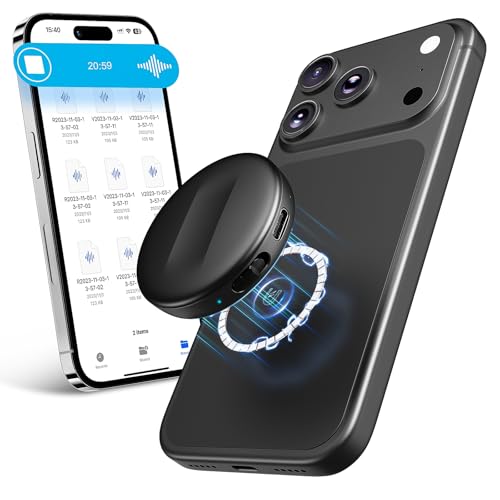
128GB Natesukii Magnetic Voice Activated Recorder - 9800Hrs Recording Device with Al-Intelligent Triple Noise Reduction Portable Dictaphone Digital Voice Recorder with Playback for Lecture Meeting
【128GB High Capacity - 70Hours Long Battery Life】Newly upgraded with 128GB - Can store up to 9800 hours...
As an affiliate, we earn on qualifying purchases.