To design notifications that respect focus, prioritize clarity and brevity, ensuring messages are concise and easy to understand at a glance. Use visual hierarchy—such as size, color, and placement—to highlight important information without overwhelming the user. Timing matters: deliver notifications during moments of low activity or when users are less engaged. Incorporate gentle cues like icons or subtle animations, and give users control to dismiss or snooze. Continuing will reveal how these strategies create seamless, non-intrusive interactions.
Key Takeaways
- Prioritize critical information using visual hierarchy to ensure important notifications stand out without overwhelming users.
- Time notifications during natural breaks or less busy moments to minimize workflow disruption.
- Keep messages concise, clear, and use icons or badges for quick comprehension.
- Offer dismiss or snooze options to give users control over their focus and attention.
- Incorporate gentle sensory cues, like soft sounds or animations, to notify without causing abrupt interruptions.
Have you ever considered how effectively designed notifications can enhance your user experience? When done right, notifications don’t just inform—they engage and guide users without disrupting their workflow. A key to achieving this balance lies in understanding user engagement and utilizing visual hierarchy. By carefully crafting notifications that respect focus, you prevent frustration and foster a seamless interaction, encouraging users to stay engaged rather than feeling bombarded or overwhelmed.
You need to think about how notifications are perceived. If they’re too intrusive or poorly designed, users might ignore them altogether or become annoyed. On the other hand, well-placed, thoughtfully designed notifications can draw attention precisely when it’s needed. This is where visual hierarchy comes into play. Using size, color, contrast, and placement, you can direct users’ eyes toward the most important information first. For example, a bold headline or a brightly colored badge signals urgency or importance, making it clear what requires immediate attention. Less critical details can be subdued, ensuring they don’t compete with more pressing messages. This strategic use of visual hierarchy helps maintain focus while still delivering essential updates.
To truly respect user focus, consider timing and context. Notifications should appear at appropriate moments—when users are less likely to be mid-task or engaged in complex interactions. Implementing subtle animations or delays can make notifications feel less abrupt, reducing the chance of disrupting the user’s flow. Additionally, offering options to dismiss or snooze notifications empowers users to control their experience, reinforcing a sense of respect for their attention and time.
Designing notifications that foster user engagement involves clarity and brevity. Messages should be concise and straightforward, avoiding unnecessary jargon or clutter. Use clear language that quickly communicates the purpose of the notification, so users can decide immediately whether it’s relevant or needs action. Incorporate visual cues like icons or badges that serve as intuitive signals, further enhancing quick comprehension and reducing cognitive load. Incorporating an understanding of sound healing science can inspire creative use of audio cues or gentle tones to make notifications more soothing and less disruptive.
Ultimately, the goal is to create a balanced approach where notifications serve as helpful guides rather than interruptions. Prioritize essential information, leverage visual hierarchy to guide focus, and be mindful of timing. When you design notifications thoughtfully, you respect your users’ focus, making their experience more intuitive and satisfying. This careful attention to detail not only improves engagement but also builds trust, encouraging users to rely on your platform without feeling overwhelmed or distracted.
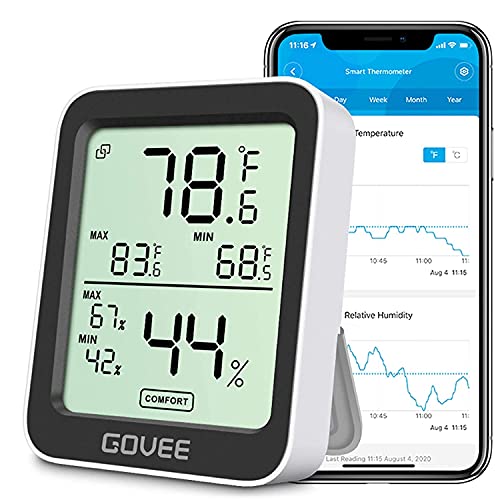
Govee Indoor Hygrometer Thermometer H5075 with Bluetooth App Control
Smart Features: The Govee Wireless Thermometer Hygrometer supports all basic functions as well as smart functions such as…
As an affiliate, we earn on qualifying purchases.
As an affiliate, we earn on qualifying purchases.
Frequently Asked Questions
How Can Notifications Improve User Productivity?
Notifications can boost your productivity by delivering timely alerts that keep you informed without interrupting your flow. You should optimize notification timing to send alerts when you’re most receptive, avoiding disruptions during deep focus periods. Additionally, choosing a considerate notification tone minimizes annoyance, encouraging you to respond promptly. When well-designed, notifications serve as helpful prompts rather than distractions, helping you stay organized and efficient throughout your day.
What Are the Key Principles of Respectful Notification Design?
You should prioritize respectful notification design by ensuring proper notification timing and giving users control. Timing matters—send alerts when they’re most relevant, avoiding interruptions during focus periods. Empower users with control options, like snoozing or customizing notifications, so they choose when and how to be notified. This approach minimizes disruption, maintains user satisfaction, and fosters a positive experience by respecting their focus and preferences.
How Do Different User Groups Perceive Notification Interruptions?
You’ll find that different user groups perceive notification interruptions through varied lenses of notification etiquette and cultural perceptions. Some users see frequent alerts as intrusive, while others expect timely updates. Cultural norms influence how interruptions are accepted—what’s polite in one culture might be disruptive in another. To respect focus, tailor your notifications considering these differences, ensuring they’re relevant, appropriately timed, and sensitive to diverse user expectations.
What Tools Are Available to Customize Notification Settings?
Think of notification settings as your personal control panel—tools that let you steer your focus ship. You can use notification toggles to turn alerts on or off instantly, customizing your experience. Many platforms offer user customization options, allowing you to fine-tune which notifications matter most. This way, you stay in command, reducing distractions and maintaining flow, all while ensuring you don’t miss critical updates when you need them most.
How Can Notifications Be Tested for Effectiveness and User Satisfaction?
You can test notifications for effectiveness and user satisfaction by analyzing user engagement metrics, such as click-through rates and response times. Conduct A/B tests with different notification timings to see which ones better capture attention without disrupting focus. Gathering user feedback through surveys or in-app prompts also helps you understand their preferences. Regularly reviewing this data allows you to refine notification timing and content, ensuring they respect user focus while maximizing engagement.

Snooze Button Sounds & Rings
The best free sounds!
As an affiliate, we earn on qualifying purchases.
As an affiliate, we earn on qualifying purchases.
Conclusion
By designing notifications that respect focus, you create a smoother, less intrusive experience for users. You keep interruptions meaningful and timely, helping people stay engaged without frustration. Isn’t it better to notify someone when it truly matters rather than bombarding them constantly? When you prioritize respectful notifications, you foster trust and improve overall user satisfaction. So, next time you design alerts, ask yourself: are you helping users stay focused or just distracting them?

PerfeSafe Life Alert for Seniors No Monthly Fee, WiFi Caregiver Call Button for Elderly at Home, Alert Button for Seniors with App Notification, Wireless Watch Pager (Only for 2.4Ghz Wi-Fi)
WiFi Wireless Caregiver Call Button: When help is needed, simply press the wristband SOS call button and caregivers…
As an affiliate, we earn on qualifying purchases.
As an affiliate, we earn on qualifying purchases.

SierraTeck Motion Activated Voice Player – Recordable, Built-in Microphone – Independent Living, Point of Sale Advertising, Door Greeter, Entry Alert
MicroSound – Indoor Motion Activated Audio Player: With 120-degree PIR wide-angle sensor and a 1 Watt built-in speaker,…
As an affiliate, we earn on qualifying purchases.
As an affiliate, we earn on qualifying purchases.