
To use focus modes effectively across all platforms, customize notifications to prioritize important contacts and apps while silencing non-urgent alerts. Schedule and automate focus periods during work or relaxation times, using visual cues like wallpapers or statuses to reinforce boundaries. Regularly review and adjust your settings to fit your routines, and consider privacy concerns when customizing notifications. Staying intentional with your focus mode setup helps boost productivity and well-being—keep exploring to learn how to refine your approach.
Key Takeaways
- Customize focus mode settings to block non-essential notifications while allowing critical contacts or apps.
- Schedule and automate focus modes for specific times to establish consistent routines.
- Use visual cues like wallpapers or status indicators to reinforce focus periods across platforms.
- Regularly review and adjust focus mode configurations to optimize productivity and relaxation.
- Combine focus modes with personalized notification whitelists for better control over interruptions.
In today’s fast-paced world, managing your attention is more important than ever, and focus modes can help you do just that. These modes allow you to carve out dedicated time for work, relaxation, or other activities by minimizing distractions. To get the most out of them, start by setting clear boundaries around your device usage. For example, when you activate a focus mode for work, you want to signal to others—and to yourself—that you’re not available for non-urgent messages or calls. This way, you protect your concentration and prevent interruptions from breaking your flow.
Customizing notifications plays an essential role in making focus modes effective. Instead of turning off everything, you can choose which notifications are vital and which can wait. On most platforms, you can whitelist contacts or apps that you consider important, such as your boss, family, or work-related apps. This selective approach ensures you don’t miss critical updates but still enjoy a distraction-free period. By tailoring notifications, you maintain control over what reaches you and when, reducing the temptation to check your device unnecessarily.
Tailor notifications to prioritize essentials and reduce distractions during focus modes.
When setting up your focus modes, think about your specific needs and routines. For instance, during deep work sessions, activate a mode that blocks social media alerts, email pings, and other non-urgent notifications. During personal time, you might allow notifications from family members or a meditation app. Customization options are flexible, so experiment with different settings to find what best helps you stay focused and relaxed. Remember, the goal is not just to silence your device but to create a boundary that respects your priorities.
Another key tip is to schedule your focus modes in advance, especially if your platform supports automation. You can set your device to automatically switch to a “work” mode during office hours or a “personal” mode during evenings. This proactive approach guarantees you don’t forget to activate focus settings, reinforcing your boundaries and streamlining your day. Additionally, you can customize the appearance of your device, such as changing wallpaper or status indicators, to visually reinforce your focus boundaries. These small cues serve as reminders to yourself and others that you’re in a focus zone.
Ultimately, using focus modes effectively involves deliberate setup and ongoing adjustment. By setting boundaries around your device use and customizing notifications, you create a tailored environment that supports your productivity and well-being. The more intentional you are about how and when you use these modes, the more they become a powerful tool to manage your attention in today’s distraction-filled world. Incorporating privacy considerations ensures your focus mode settings align with your personal boundaries and data security preferences.
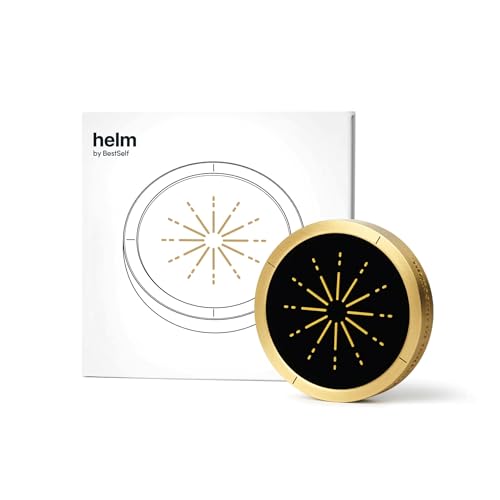
BestSelf Helm Focus Device – Premium NFC-Powered Phone Distraction Blocker Physical App Blocker Tool for Deep Work, ADHD Focus, and Screen-Free Productivity
🔒 Physical Focus, Reclaimed Power – Crafted from solid aerospace-grade brass, Helm transforms your screen time into real…
As an affiliate, we earn on qualifying purchases.
As an affiliate, we earn on qualifying purchases.
Frequently Asked Questions
Can Focus Modes Be Scheduled Automatically?
Yes, you can schedule Focus Modes automatically through app integration and automatic scheduling features. You set specific times or triggers, and your device activates Focus Mode without you needing to do anything. This helps you stay focused during meetings or work hours effortlessly. Many platforms support this, allowing you to customize based on your routine. This way, your Focus Mode seamlessly fits into your daily schedule, boosting productivity.
How Do Focus Modes Affect App Notifications?
Think of focus modes as a gatekeeper for your notifications. When activated, they control app notification management by silencing or limiting alerts, which helps reduce distractions. You can customize which notifications come through, ensuring only important messages get your attention. This way, focus modes act like a filter, keeping your mind clear and helping you stay concentrated without being overwhelmed by constant app notifications.
Are Focus Modes Customizable for Specific Contacts?
Yes, focus modes are customizable for specific contacts through contact exceptions. You can personalize your focus mode by allowing notifications from certain contacts, ensuring you don’t miss important messages. This focus mode personalization helps you stay connected with trusted contacts while reducing distractions from others. By adjusting contact exceptions, you create a tailored experience that balances your need for focus with the importance of staying in touch.
Can Focus Modes Be Shared Across Multiple Devices?
Imagine your focus settings spreading like wildfire across all your devices—yes, you can share focus modes! Thanks to cross device synchronization, your preferred focus modes automatically update on every device, ensuring consistent focus without manual adjustments. You can set shared focus settings, making sure your focus preferences stay unified whether you’re on your phone, tablet, or computer. It’s like having one seamless focus experience across your entire digital world.
What Privacy Settings Are Available Within Focus Modes?
You can customize privacy controls within focus modes to limit notifications from specific apps or contacts, ensuring your focus stays undisturbed. You also have notification management options, allowing you to choose which alerts appear during focus sessions. These privacy settings help protect your information and reduce distractions, giving you control over what others see or hear when your focus mode is active. Adjust these features in your device’s focus or notification settings.

Habit Control Smart Lock – App-Controlled Access for Snacks, Food & Alcohol – 3-in-1 Modes: Timer, Schedule & Simple Lock to Build Focused, Healthy Habits – for Refrigerators, Cabinets & Drawers
BUILT-IN VIRTUAL TEST LOCK: Explore the full functionality of the Habit Control app with a virtual lock before…
As an affiliate, we earn on qualifying purchases.
As an affiliate, we earn on qualifying purchases.
Conclusion
Think of focus modes as your lighthouse in a stormy sea. They guide you through distractions, illuminating your path to productivity and clarity. By mastering their use across all platforms, you become the captain of your attention, steering clear of the storms of interruptions. Embrace these tools as your guiding light, helping you navigate toward your goals with confidence. When you harness focus modes effectively, you’ll find your journey smoother and your destination closer than ever.
visual cue wallpapers for focus
As an affiliate, we earn on qualifying purchases.
As an affiliate, we earn on qualifying purchases.

WiFi Door Sensor: Smart Door Open/Closed Detectors, Wireless Window Sensor with App Notification Alert, Contact Sensor for Home Security, Compatible with Alexa Google Assistant (2pack)
TUYA DOOR SENSOR: Upgraded door alarm with bluethooth and Wi-Fi dual connecting mode, No gateway hub required; Simple…
As an affiliate, we earn on qualifying purchases.
As an affiliate, we earn on qualifying purchases.